Features

Everything PrismLCA does, in one place.

A full life cycle assessment workbench on Brightway 2.5, an AI agent that researches, models and reports in plain sight, and a study report bound to your model — free, open source, on your computer.

  • 101features
  • 6import formats
  • 8report themes
  • 5report languages
  • 0bytes sent without your click

General

Free, open and on your desktop, on the engine LCA researchers already trust.

10 features
  • Free and open sourceNo licence fee, no account, no trial. AGPL-3.0, every line on GitHub.
  • Built on Brightway 2.5The proven open LCA engine underneath. Workspaces are standard Brightway projects you can open in Python any time.
  • Start free with the BAFU database — bring your own ecoinventBegin today with the free Swiss federal LCI database; add your ecoinvent licence when you have one.
  • AI-native, and still useful without AIPrismLCA is built around its agent, and that is where it is strongest. Modelling, results and reports still work without an AI key, so you can start before you pick a provider.
  • Windows and LinuxInstallers for Windows and Linux. macOS is coming soon.
  • Workspaces and foldersA workspace holds ecoinvent and BAFU side by side, the impact methods they share and the models built on them; models sort into folders.
  • Pick up where you left offThe start page lists the models you opened last — one click reopens them.
  • Nothing to saveEvery change is written the moment you make it, so closing the app loses nothing. Undo and the audit log are the way back.
  • A handbook for every screenStep-by-step guides with screenshots, from the first import to the finished report.
  • Tutorial videosShort video walkthroughs of the main workflows, from the first model to the report.

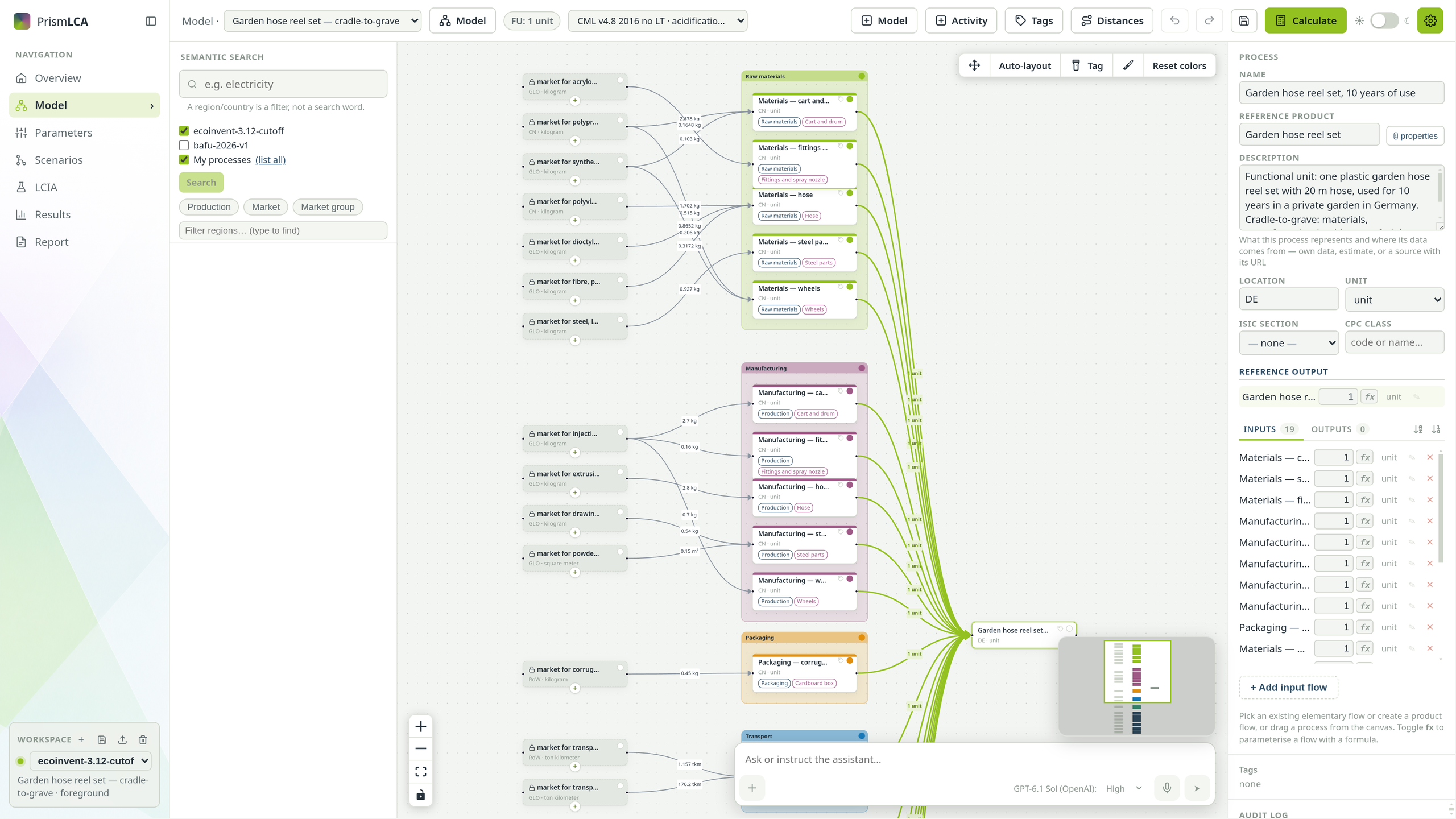
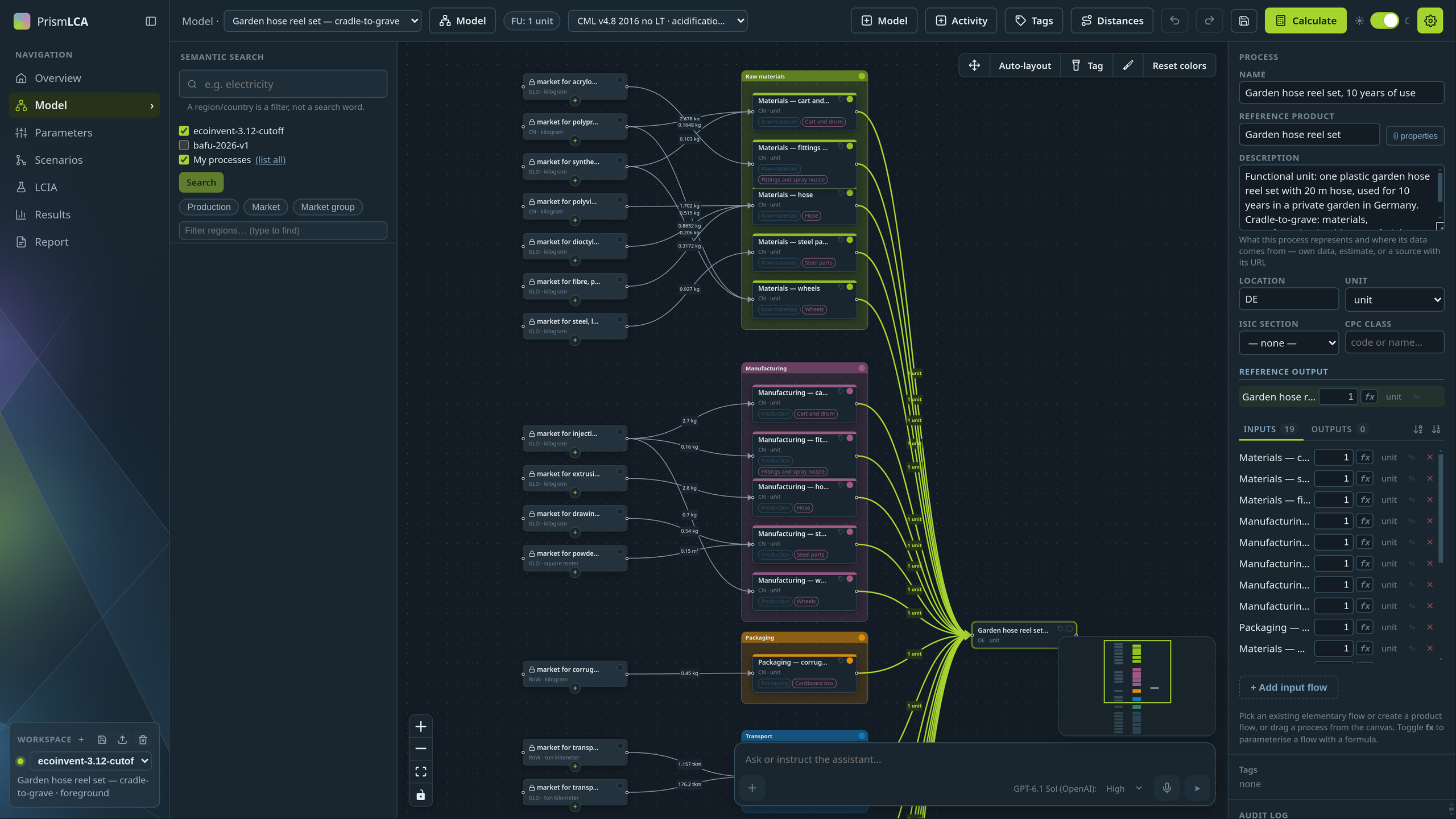
Light or dark, as you like it.

PrismLCA in light mode: a model on the canvas

AI Assistant

An agent that researches, models and reports, in plain sight.

26 features

From a bill of materials to a model

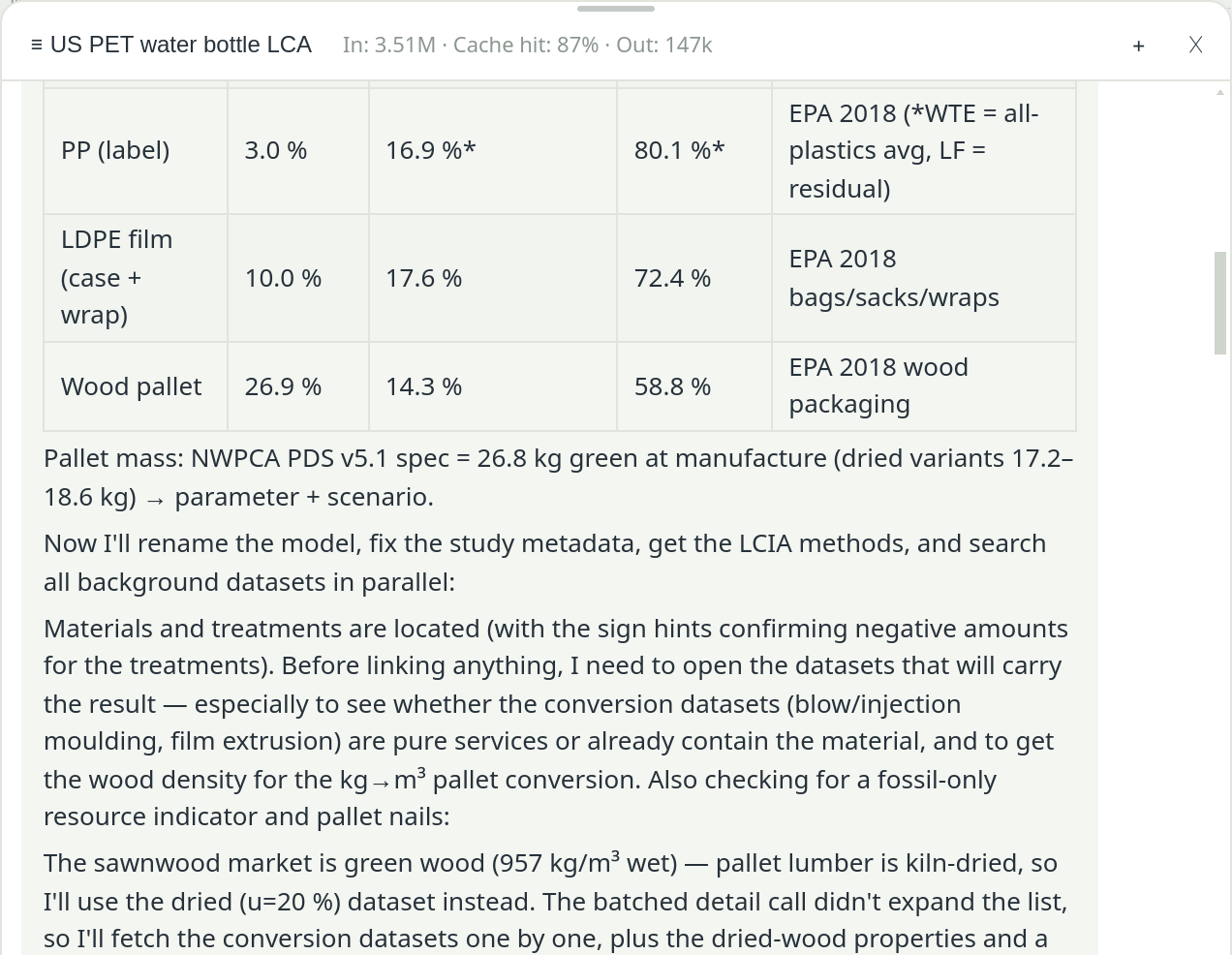
Hand over a parts list or a product description. The agent researches what the databases cannot tell you, opens every dataset before it links it, and builds the model on the canvas while you watch: materials, processes, transport and end of life.

  • Attach PDFs, spreadsheets, images and Word files
  • A visible plan that survives an interruption
  • Every tool call shown live, with its cost
  • Every change undoable, a whole turn at once
Research: It reads the data sheets and statistics the databases cannot give you, and says how sure each figure is.
It reads the data sheets and statistics the databases cannot give you, and says how sure each figure is.
Build: Process by process on the canvas, every dataset opened before it is linked.
Process by process on the canvas, every dataset opened before it is linked.
Explain: It reads the contribution tree and tells you where the impact comes from.
It reads the contribution tree and tells you where the impact comes from.

It asks before it decides

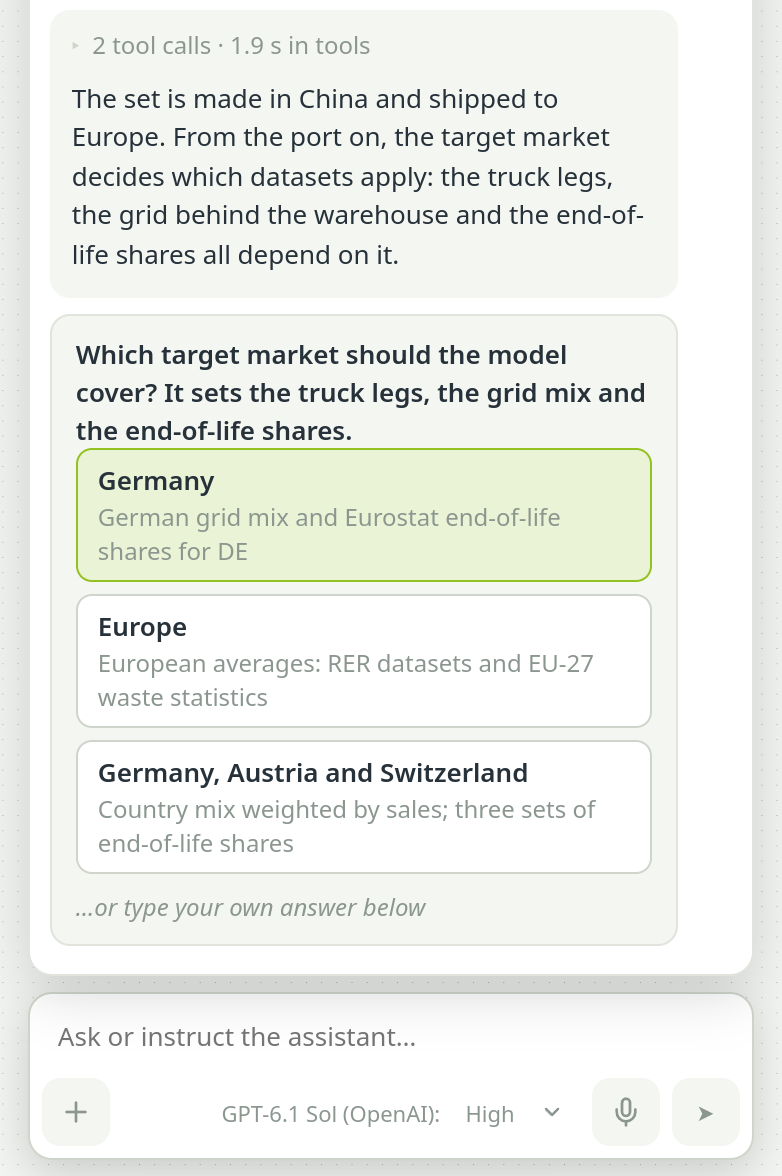
A market, a region, a missing dataset: choices that move the number come to you as clickable options instead of a silent guess.

  • Questions as options, or your own answer
  • Talk to it while it works, or stop it
  • Irreversible actions ask first
A question card in the chat with three target markets to choose from

A plan you can follow

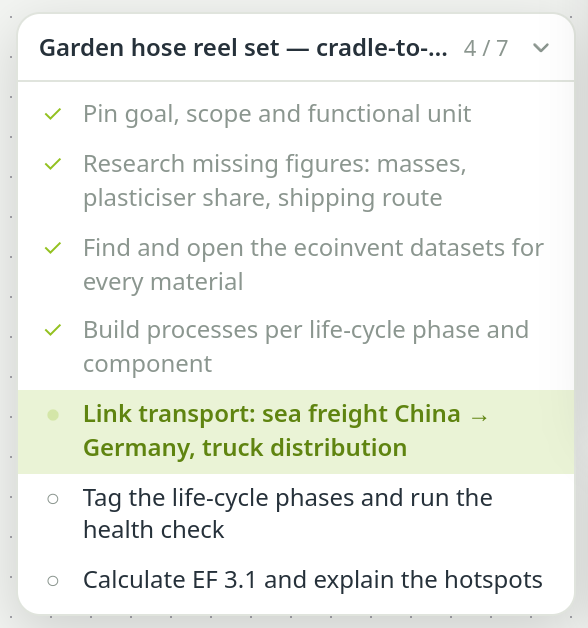
On longer tasks the assistant keeps a checklist beside the chat: done steps dimmed, the current one highlighted. If a run is interrupted, Continue picks it up where it stopped.

  • The plan belongs to the model
  • Collapses to a pill when you need room
The plan card: four steps ticked off, the current one highlighted
  • Research with graded sourcesWeb research for what the databases lack. Every finding comes with its source, how reliable it is, and the gaps it could not close.
  • Opens every dataset before it links itA search hit is never a choice: it reads the dataset's own documentation first and catches proxies built for something else.
  • It sees what a market blendsWhen the assistant searches, a market dataset comes with its main suppliers and their shares, so it knows what it links before it picks it.
  • Ask your results whyReads results across all indicators, explains the hotspots and tests the assumption your result hangs on.
  • An AI review of your modelA separate reviewer checks the model against your brief and its data, and reports what does not match.
  • A health check for every modelFinds double counting, end-of-life traps, broken life-cycle phases and numbers that do nothing, and repairs them where the fix is clear.
  • Change a model with one sentenceSay “add road transport to every material” and it edits in batches, by process name, and lists what changed.
  • Skills it can loadMethod guides on demand — end-of-life, transport, proxies, your own conventions — picked from the chat's + menu.
  • Fails out loud, not quietlyWhen data is missing or a step fails, it names the gap instead of filling it with a guess.
  • Talk to it while it worksType during a run: your message waits and reaches the assistant after its current step. Stop it any time without losing progress.
  • Voice controlSpeak instead of typing and tell it what to build, change or explain.
  • End-of-life rates on requestIt fetches recycling, landfill and incineration rates from Eurostat for the country and material at hand.
  • Distances on requestIt looks up road and sea routes between named places and turns them into tonne-kilometres.
  • Comparisons that stay consistentLink the models you want to compare and the assistant knows the other one's functional unit, boundaries and assumptions, so it models both the same way. It also knows your own processes.
  • Long sessions without losing the threadWhen a run fills the context, older tool results are condensed into a summary instead of cut off, and costly research and reviews are kept to the last. Follow-up questions draw on the real tool calls of the previous turn, and a context meter shows how full it is.
  • Several assistants at onceRun chats on several models in parallel, each with its own AI model; a note tells you when one in the background finishes.
  • Your key, your provider, your costsOpenRouter or OpenAI with your own key, a cost limit, and every cent in the ledger.
  • Current models from the frontier labsClaude, GPT and Gemini in their current versions, each with its price, kept up to date with each release.
  • The top open-weight modelsGLM, Kimi, Qwen, DeepSeek, MiniMax and MiMo, often at a fraction of the price.
  • A different model for each jobChat, web research, model review, report writing and import matching can each run on their own model: a strong one where it counts, a cheap one where it is enough. Reasoning effort is set per model.
  • Zero data retention by defaultOnly providers that keep no copy of your prompts. Claude, GPT and Gemini are exceptions by default and run under their vendors' own retention terms; untick one for strict zero retention. Training on your data is always refused.
  • Web lookups visible and cappedEach reply shows how many web searches ran, and you set the limit.
  • Full transparency: every tool call visibleEach step appears live with its duration; open any row for the exact arguments and result. Every turn shows its tool time and cost.

Modelling

A visual canvas on a full LCA engine, from the first box to the last parameter.

12 features

Model on a visual canvas

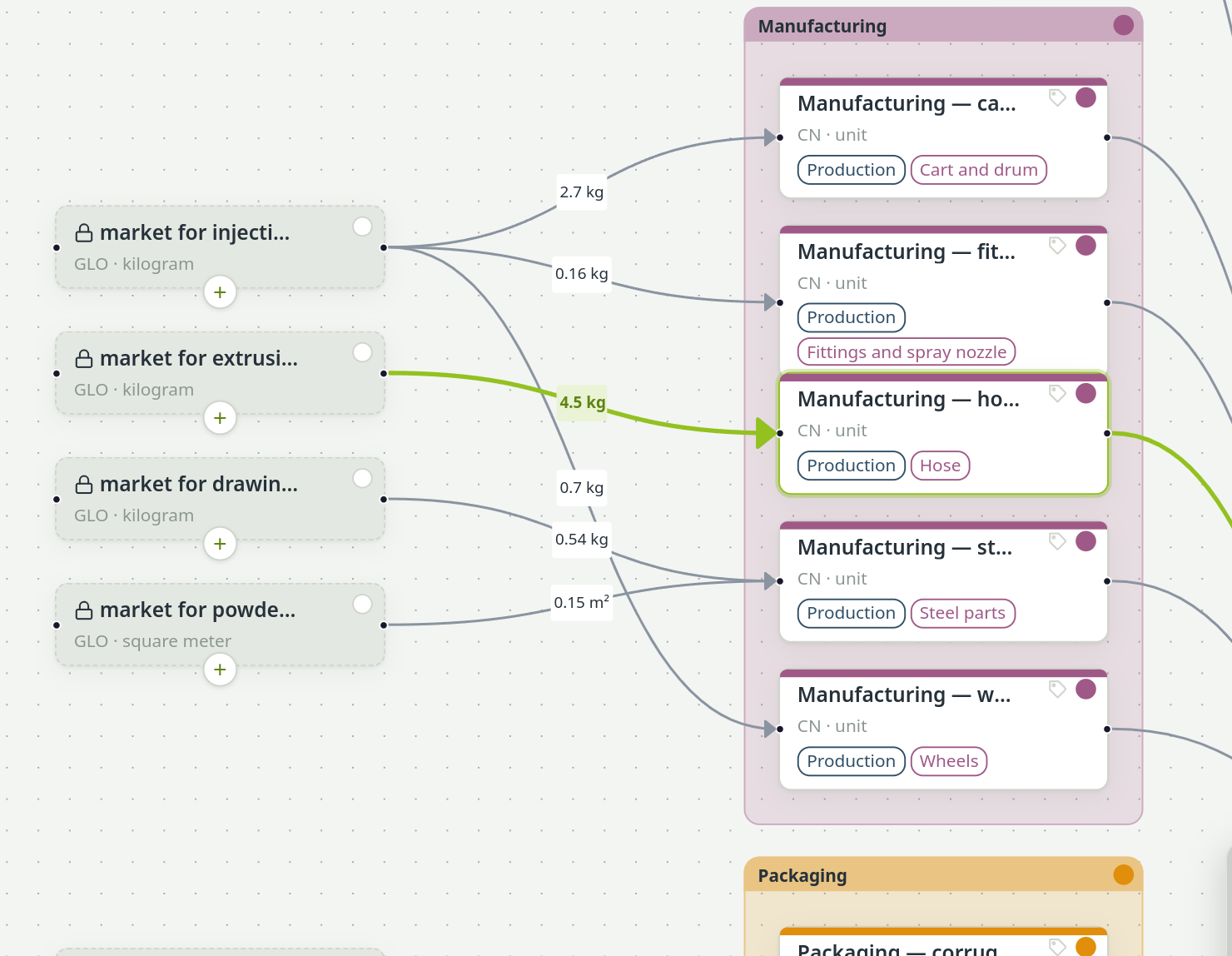
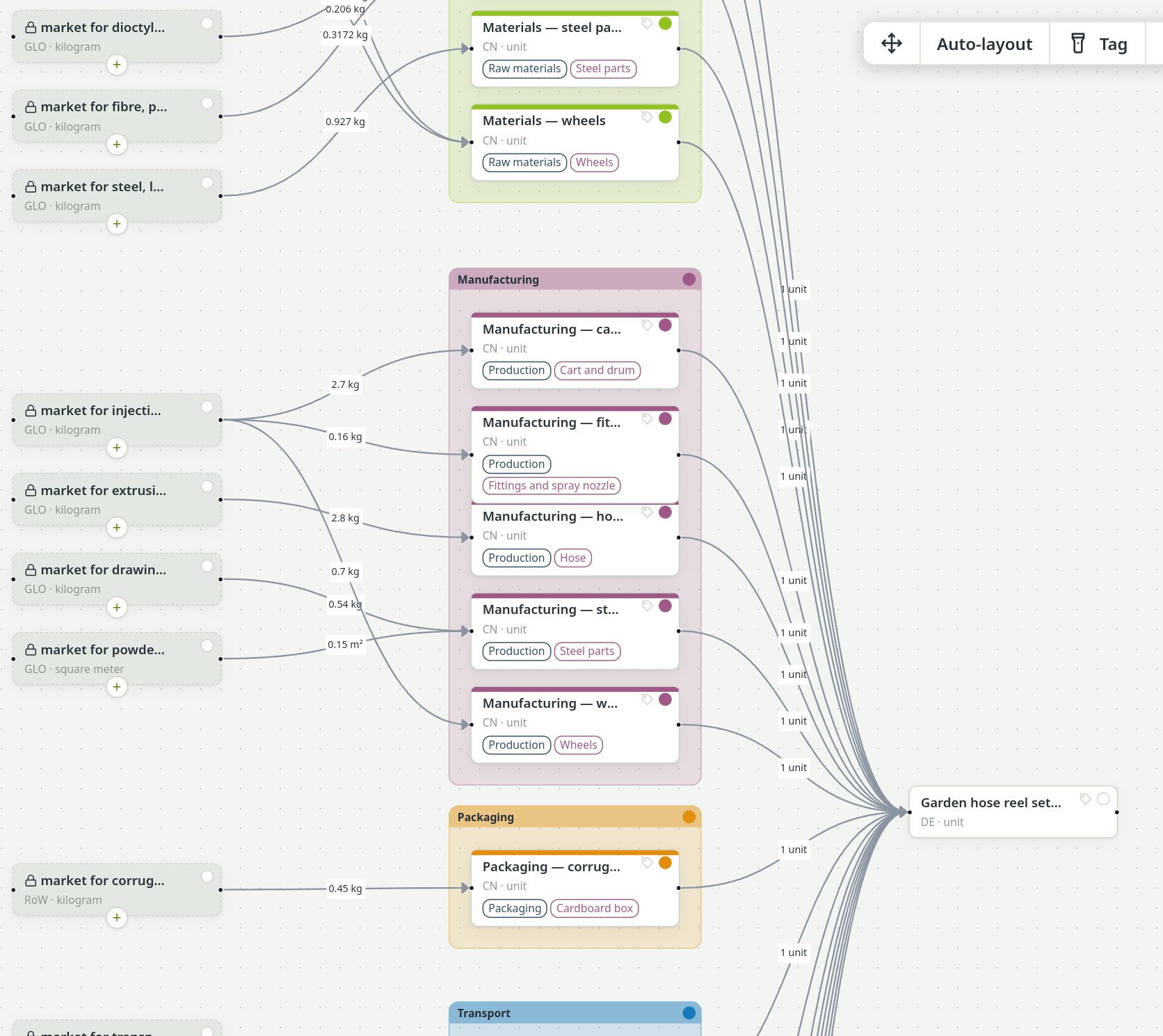
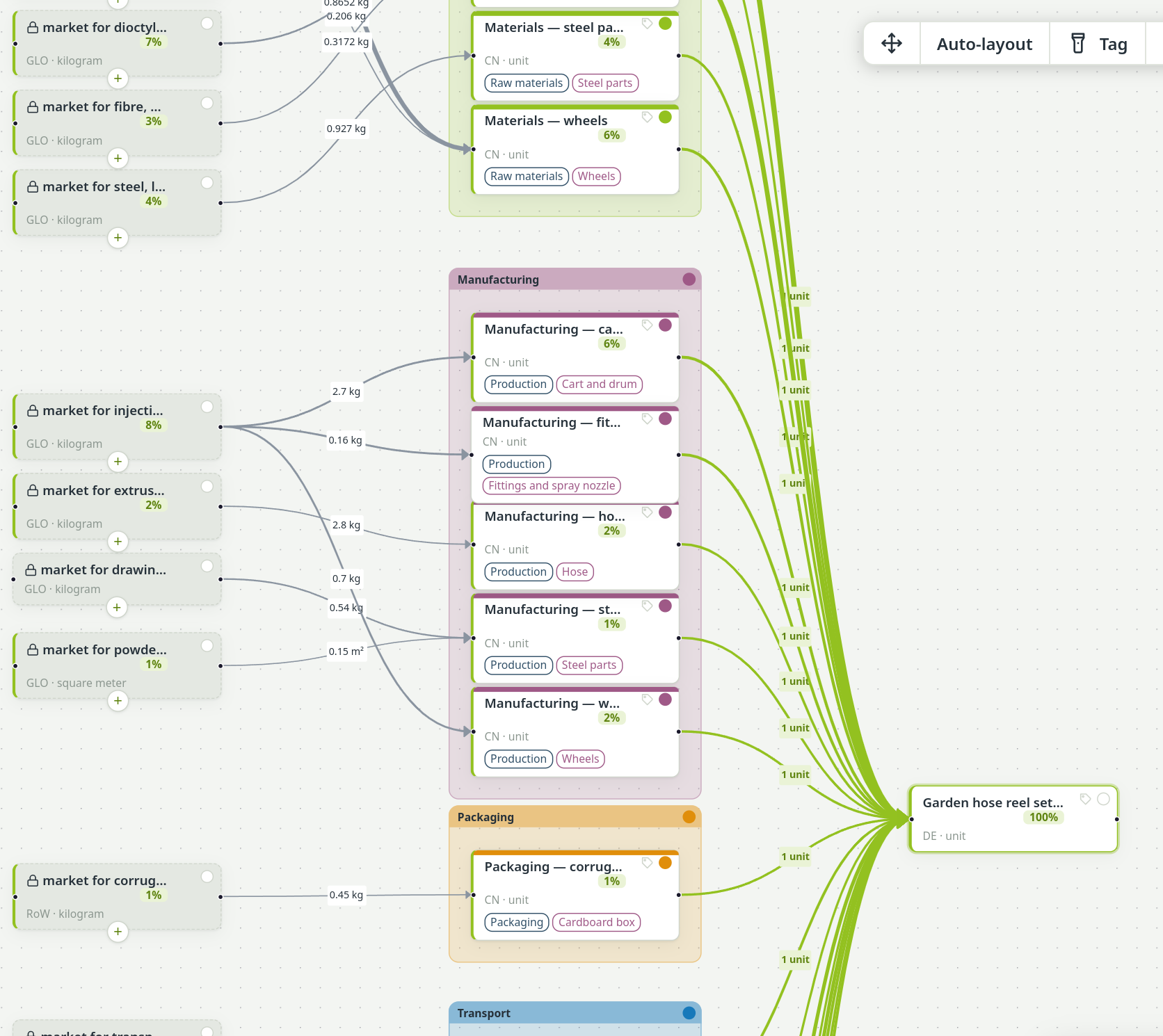
Processes are boxes, flows are lines. Drag datasets in from the search and connect them like in a diagram tool. Press Calculate: every process shows its share, and the flows into your product thicken with their impact.

  • Results drawn over the model
  • Every process shows its share
  • Auto-layout in life-cycle columns
  • Drag, link and edit like a diagram
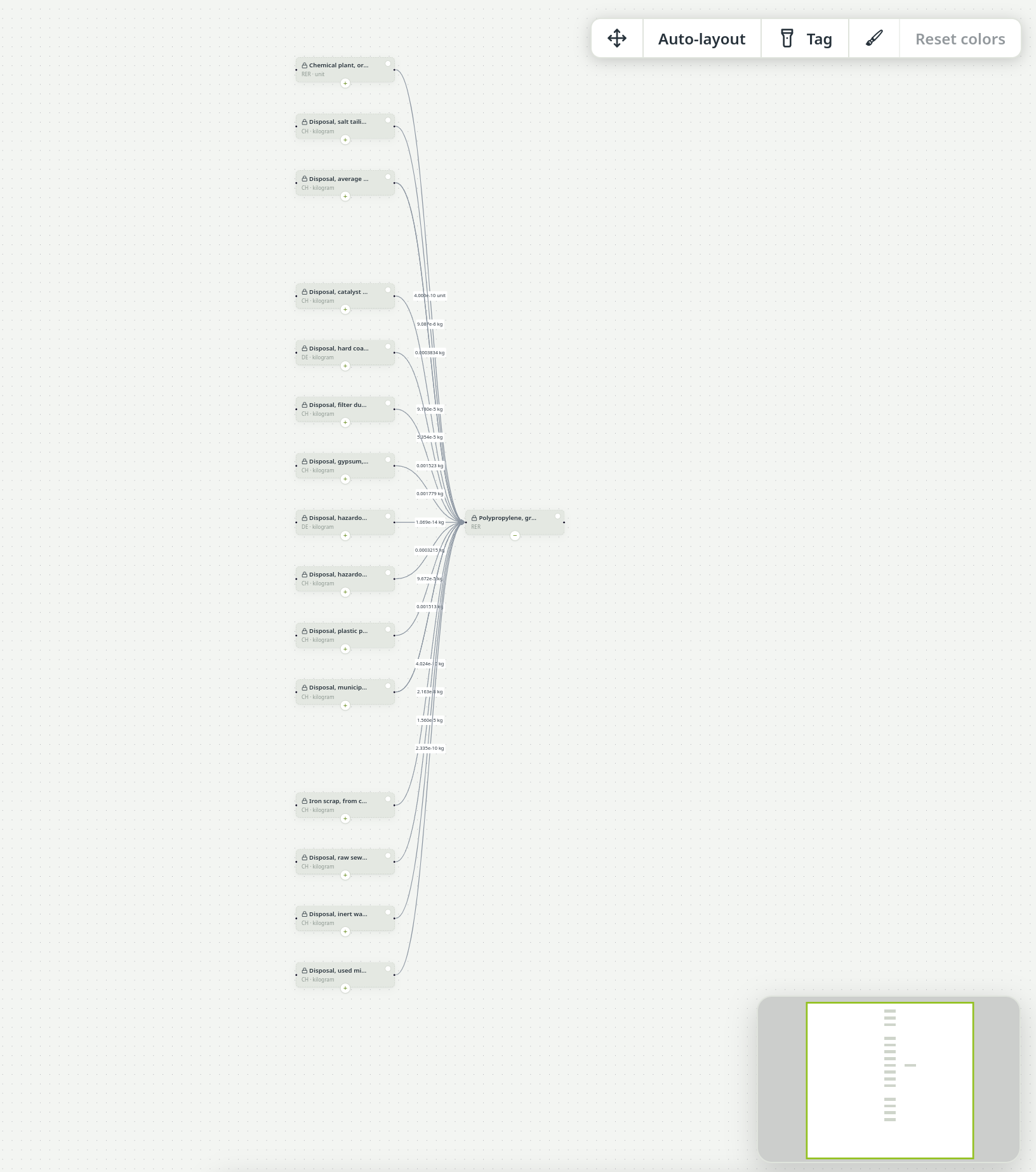
The garden hose reel model on the canvas, before and after Calculate — before Calculate

Parameters and formulas

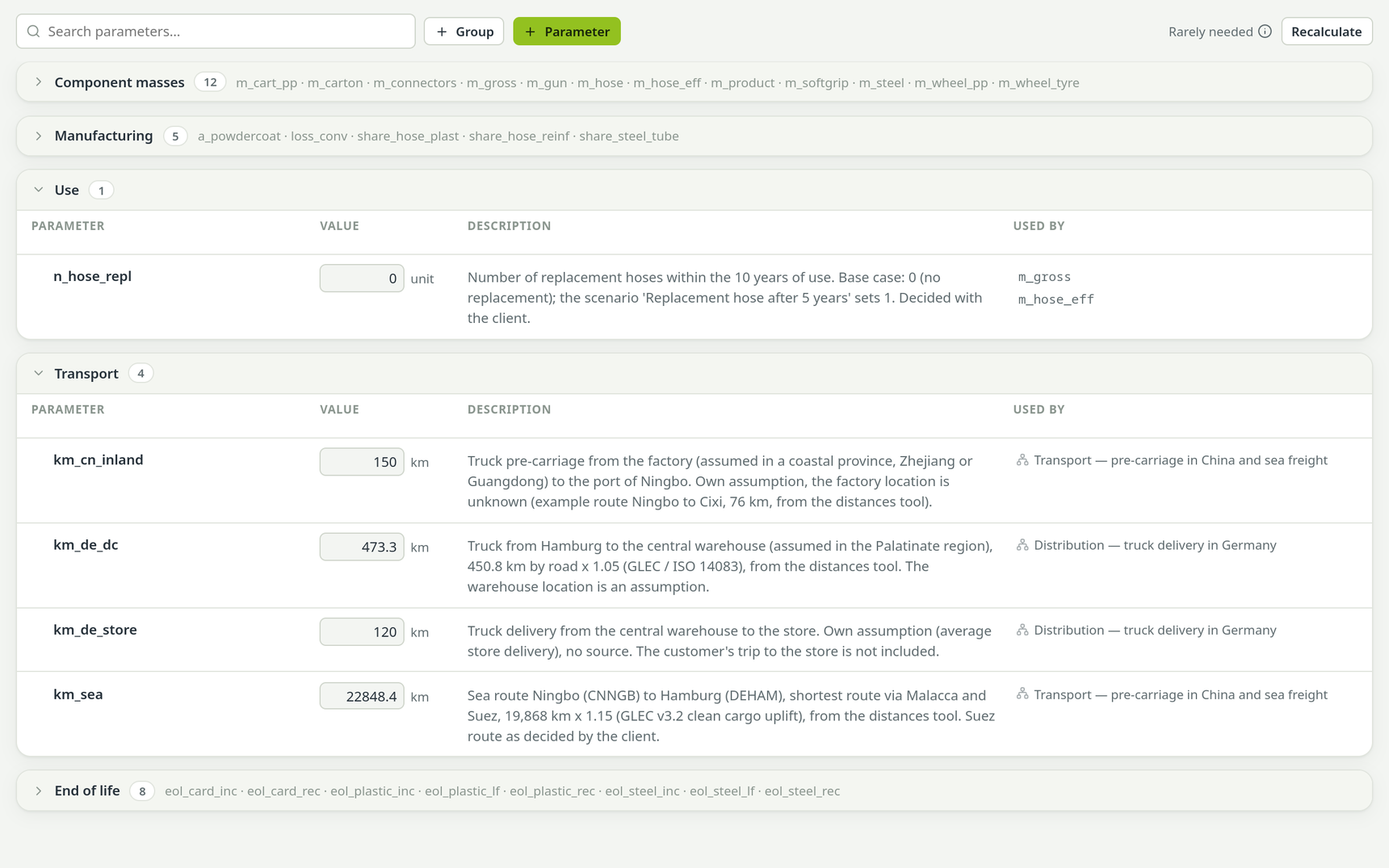
Drive any amount with a formula: about 75 maths functions from sqrt and log to mean, percentile and where, names that autocomplete, value ranges and rounding. Every parameter carries its source.

  • Grouped and documented
  • The assistant can set them too, with its reasons
Parameters in groups, each value with its formula and source

Open the supply chain and dive deep

Expand any background process upstream, level by level, right on the canvas. See what a dataset is made of without leaving your model, and fold it away again.

  • Works for ecoinvent and BAFU datasets
  • Expanded parts stay out of your model
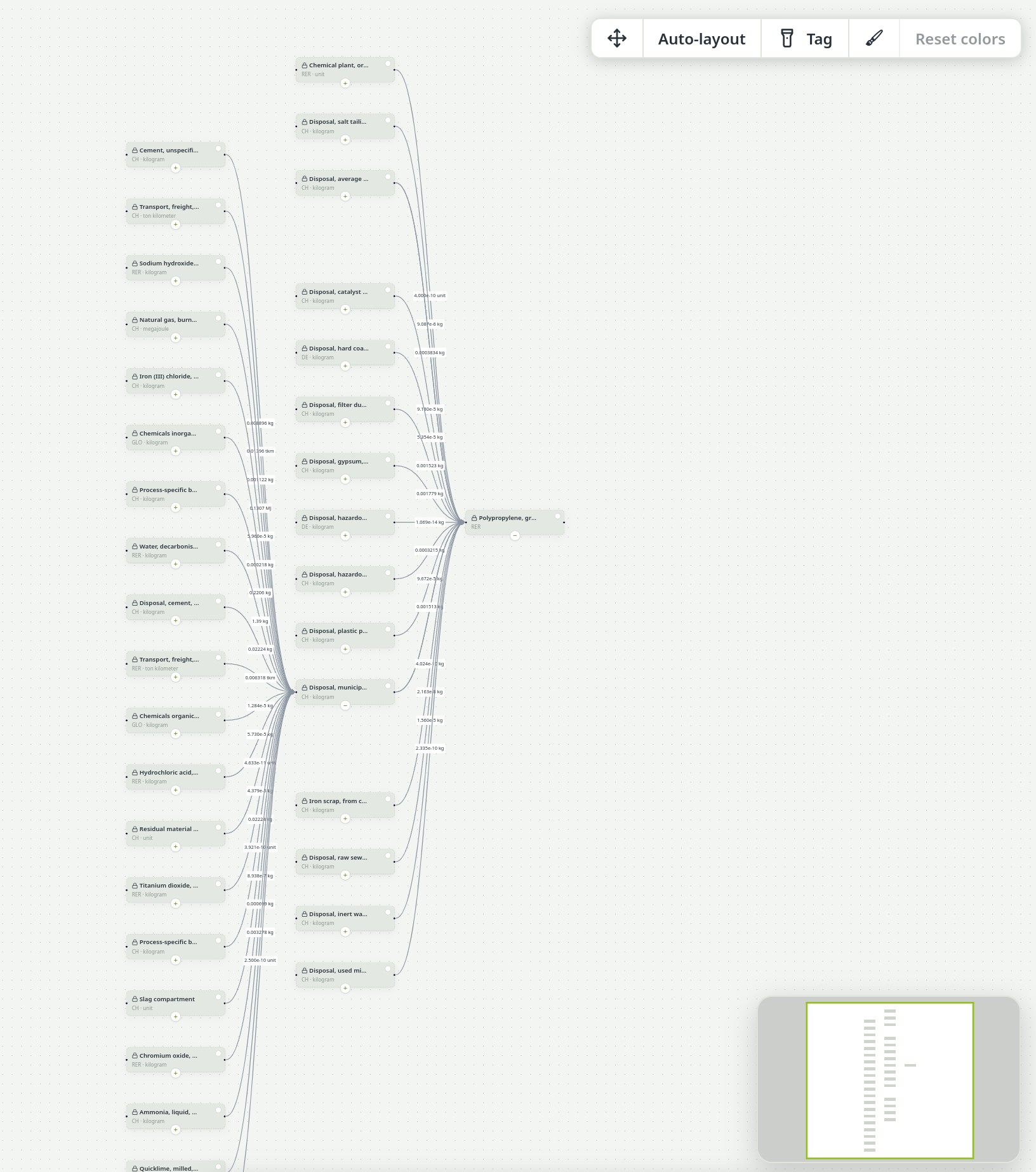
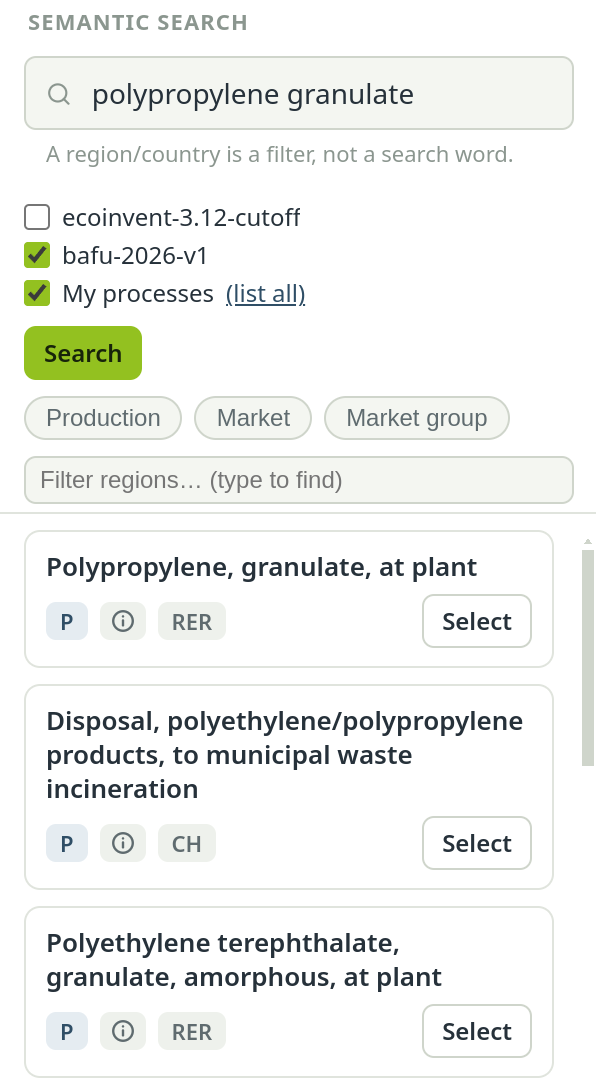
Find: One BAFU dataset on the canvas: polypropylene granulate.
One BAFU dataset on the canvas: polypropylene granulate.
Open: Its fifteen upstream inputs, one click.
Its fifteen upstream inputs, one click.
Dive deep: One level further, right where you are.
One level further, right where you are.
  • Scenarios, side by sideVariants as parameter overrides — by hand, from Excel, with formulas or by the AI agent — compared in every result.
  • A scenario that changes nothing says soVariants that return the baseline are flagged instead of silently looking different.
  • Groups, colours and a minimapFrame processes into groups, colour them, and keep your bearings on large models.
  • Tags drive your result breakdownsTag processes by life-cycle phase, component, supplier or anything else. Each tag group becomes its own breakdown of the results, and one model can carry several side by side.
  • Location suggestionsType a code or a name; every location your databases and models use is offered.
  • Your own process libraryDatasets you build or import live in one library per workspace; a change reaches every model that uses them.
  • Edit background data safelyBackground databases stay read-only; changing a dataset makes a marked copy with its origin recorded.
  • Direct emissions and resourcesAdd elementary flows straight from the biosphere, searchable and with compartment and unit.
  • Documentation on every processSources, comments and data-quality notes travel with each process and flow and end up in the report.

Results

Every impact category at once, and analysis you can read without a manual.

8 features

Contribution analysis you can read

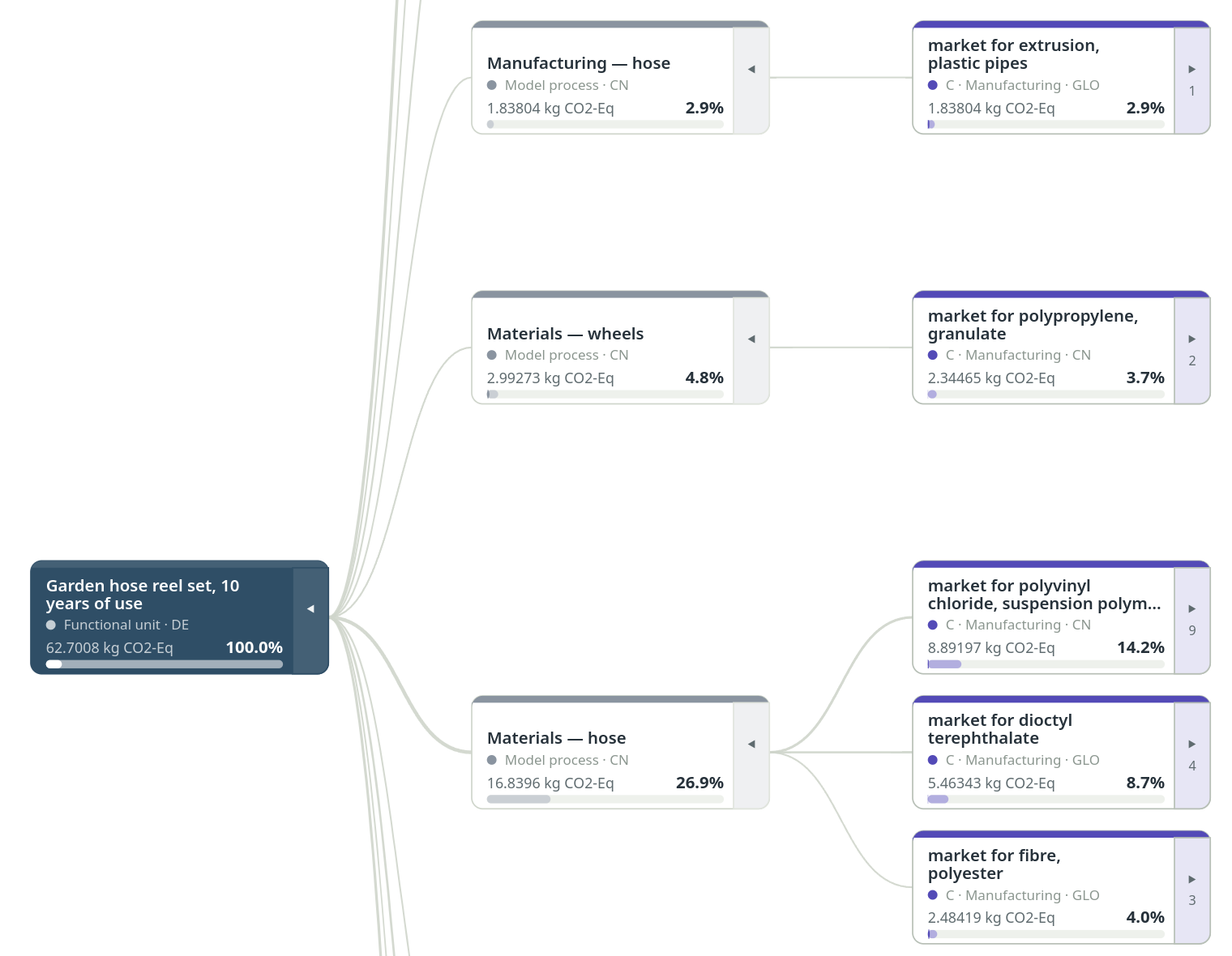
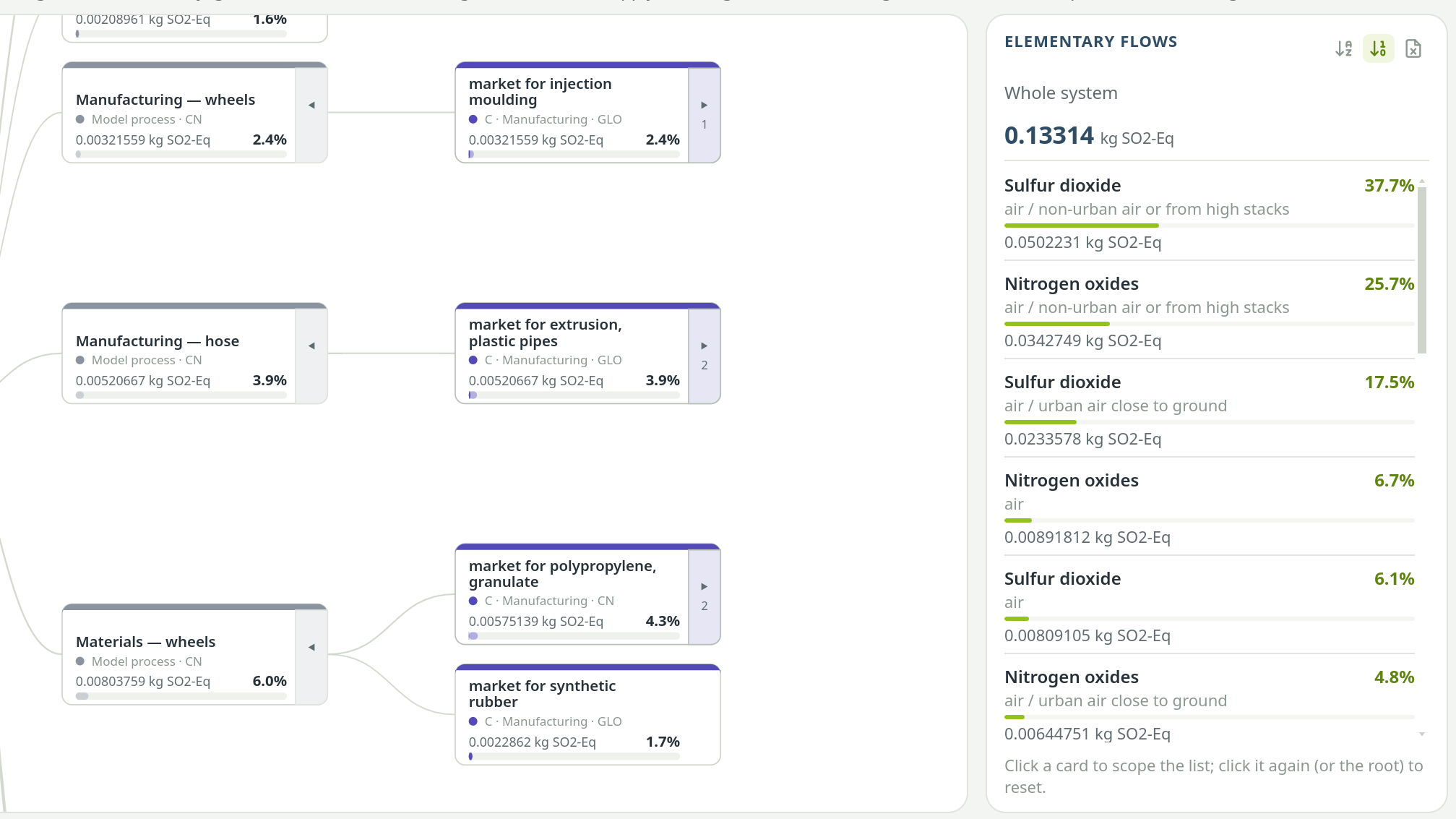
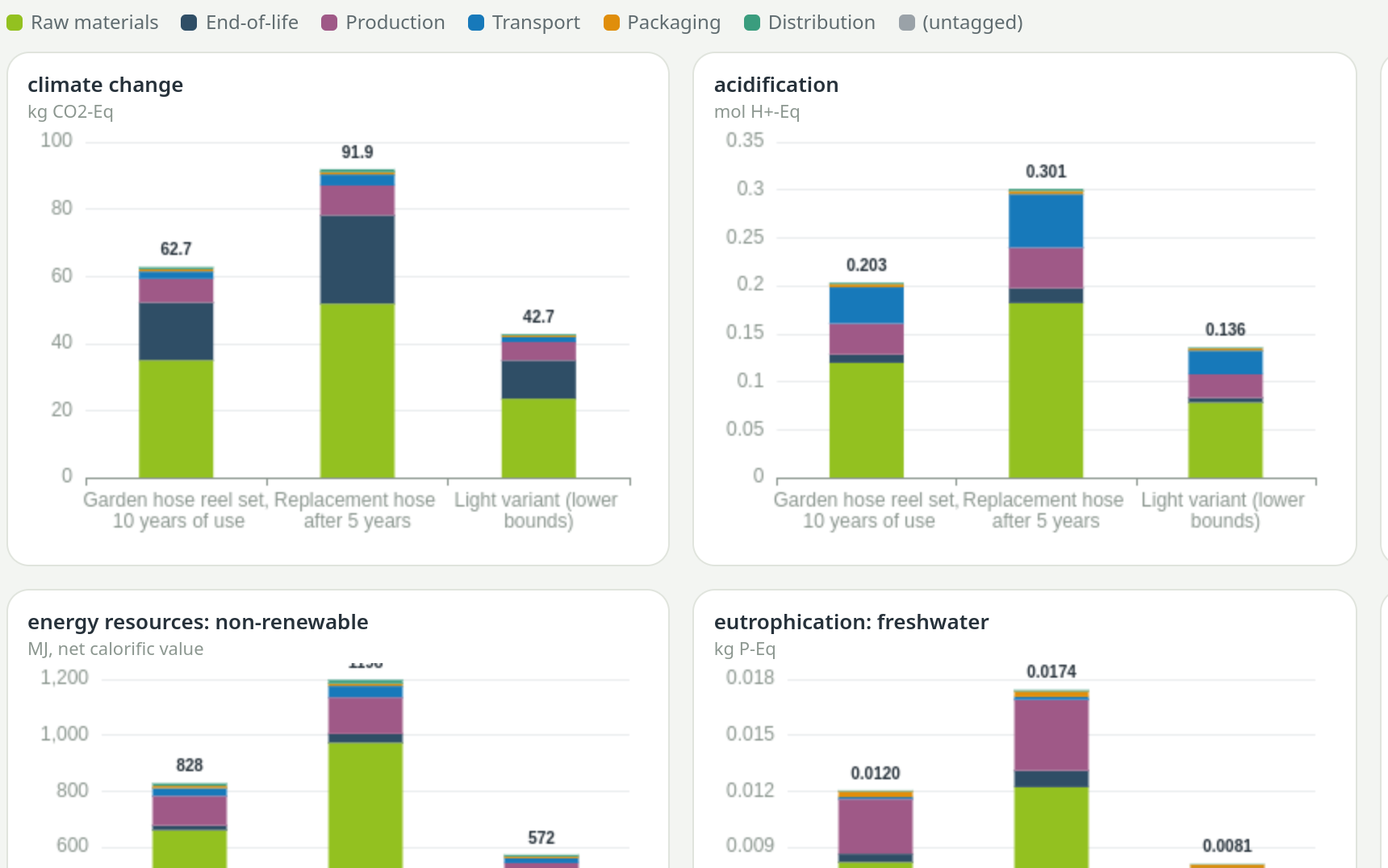
An interactive tree per indicator — pan, zoom, expand any branch — with the elementary flows behind every node. Split results by life-cycle phase, by ISIC or CPC class, or by your own tags, and compare variants side by side.

  • Pan, zoom and expand any branch
  • Click a node to scope its flows
  • Save any chart as an image
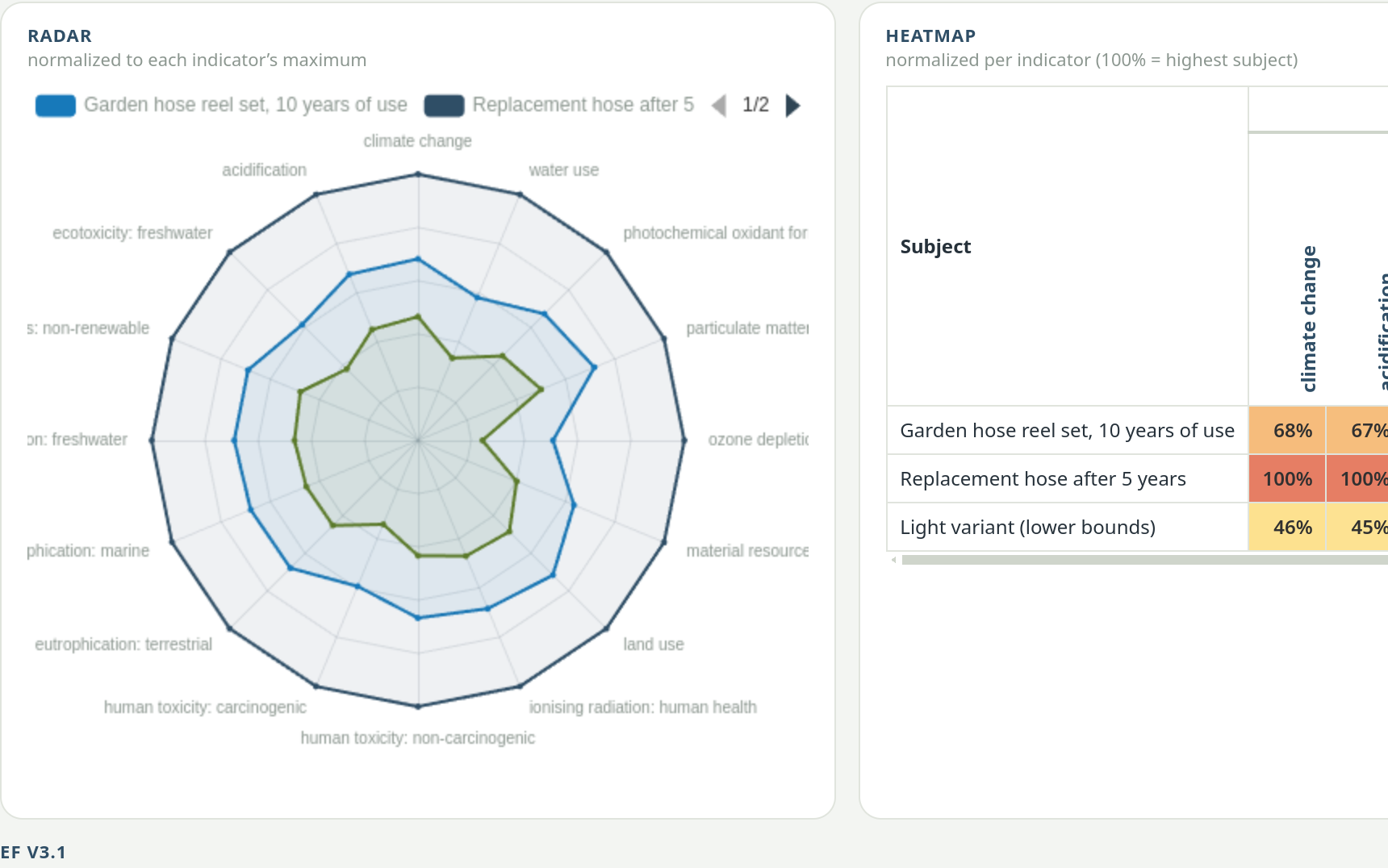
Contribution tree: Results: contribution tree with elementary flows, bars per indicator and a radar
Per indicator: Results: contribution tree with elementary flows, bars per indicator and a radar
Radar and heat scale: Results: contribution tree with elementary flows, bars per indicator and a radar
  • Every impact category in one clickEF 3.1, ReCiPe, CML, IPCC and the other methods that come with your database, calculated together.
  • By phase, by class, by your own tagsSplit every result by life-cycle phase, ISIC or CPC class, or any tag — component, supplier, scenario.
  • Compare variants, models and database processesPut your scenarios, other models or any background dataset, say an ecoinvent paper, side by side, with deltas, hotspot tables, trade-offs, radar and heat-scale charts.
  • Elementary flows behind every nodeClick a process in the tree and see which emissions and resources make up its share.
  • Every chart saved in one goPick a folder once; every chart on screen lands in it as PNG, with the same heat scale as on screen.
  • Excel exports that come apartOne row per life-cycle phase or class, ready for your own pivot tables.
  • Compare impact methods and build your ownCharacterisation factors side by side; create, duplicate and edit methods and method families.

Report writer

A complete, typeset study report — drafted by AI, bound to your model, released by you.

17 features

A full study report, written for you

Goal and scope, inventory, results and interpretation, drafted chapter by chapter after the assistant has queried the model — then checked, read through once more and typeset, with tables, charts and a system-model figure drawn from the model itself.

  • Write all chapters at once, or one by one
  • Tables and charts drawn from the model
  • Rendered to PDF in the app
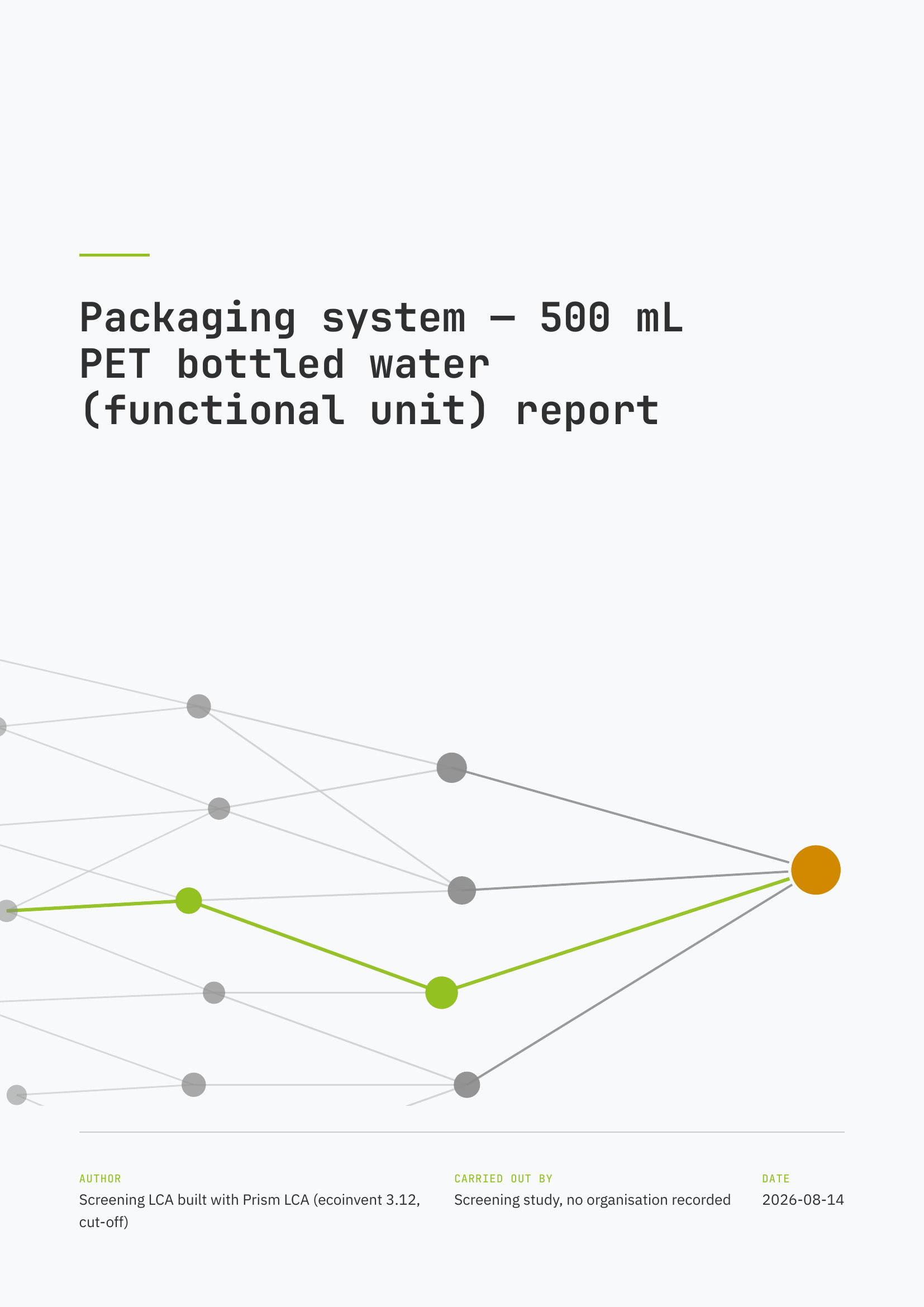
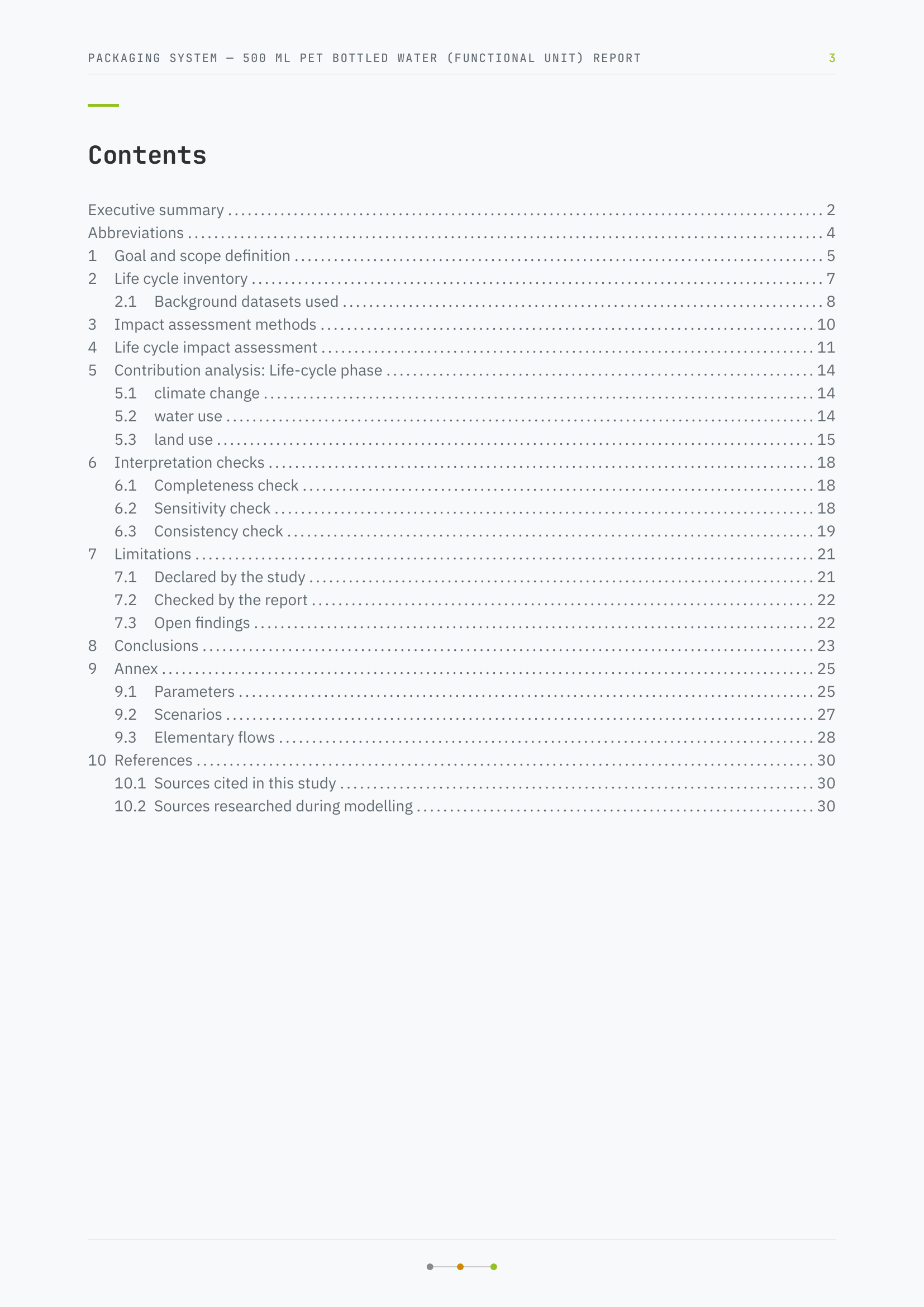
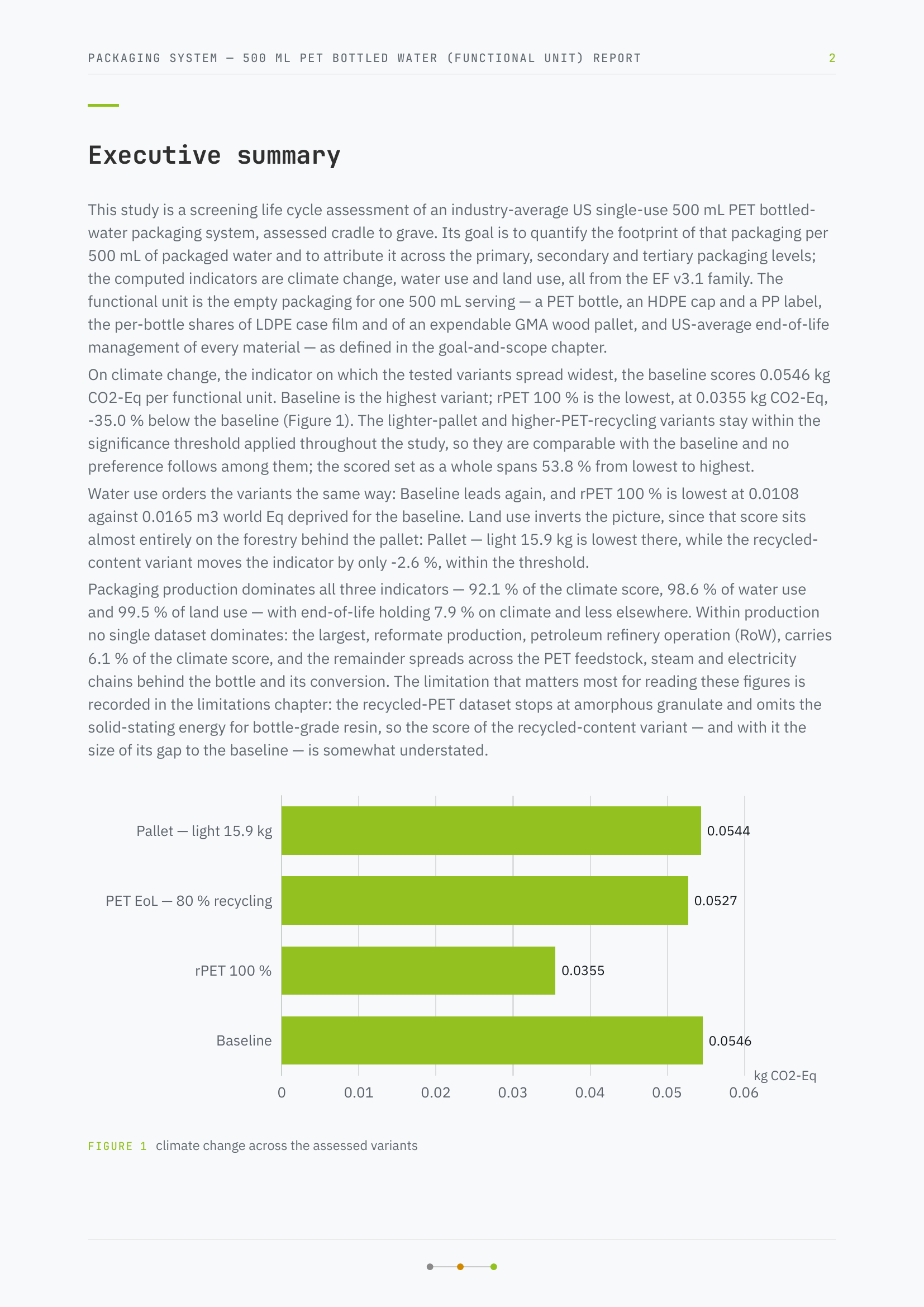
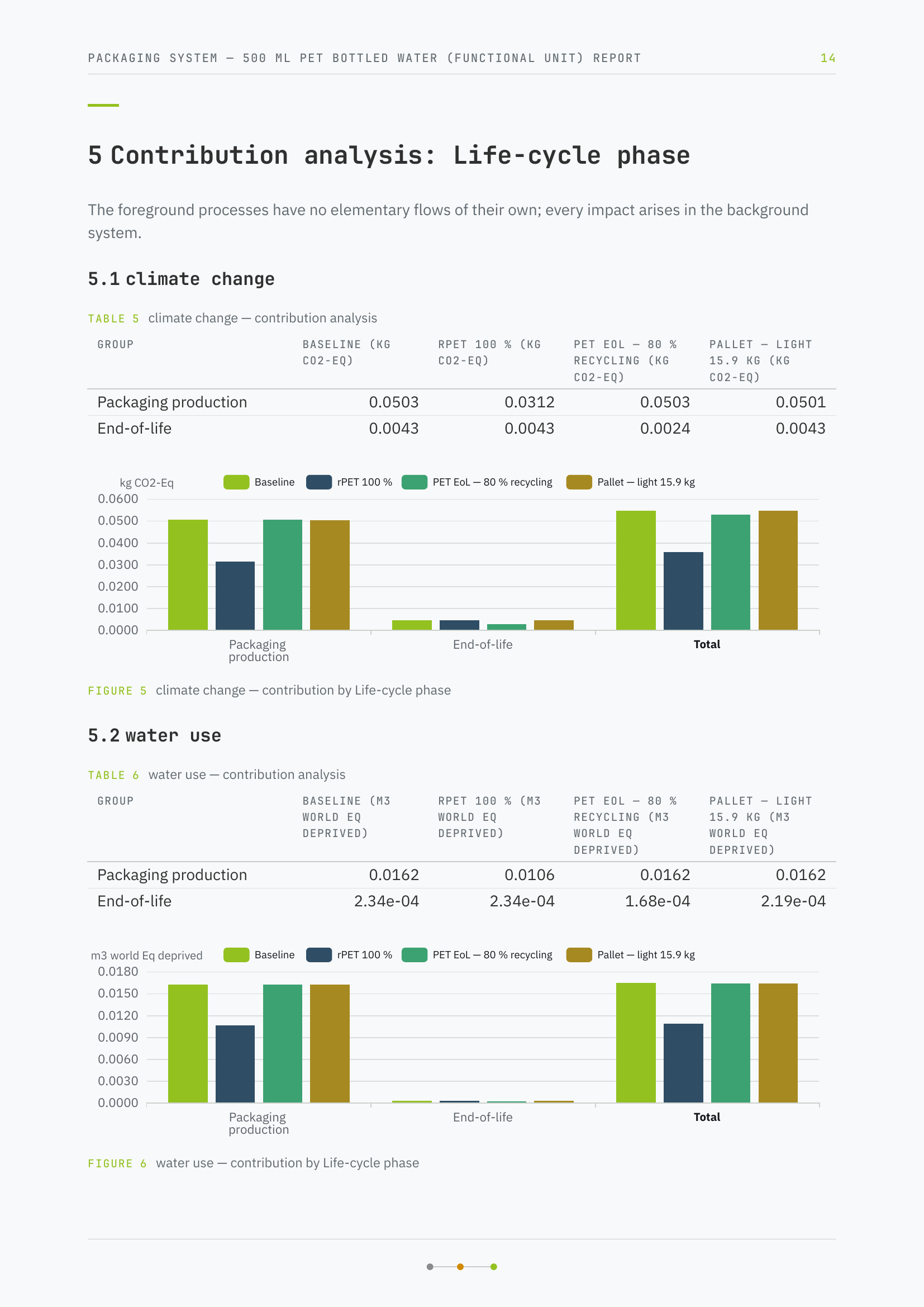
Four pages of a generated study report: cover, contents, summary and a results chapter Report page 2 Report page 3 Report page 4

Numbers are never typed out

Every figure in the text is bound to the model. Change the model and the chapter tells you it is out of date; a release you gave lapses as soon as wording or figures move.

  • Out-of-date chapters are marked
  • No figure goes stale unnoticed
5.1 Climate changeReleased

Over ten years of use, the garden hose reel set causes 51.9 kg CO₂-eq. The hose alone accounts for 24 % of it.

Hose mass in the model

Illustration. In the app every bound figure is read from the model when the chapter is rendered.

  • Five languagesEnglish, German, French, Spanish or Portuguese, with matching number formats and offline spell checking.
  • Your brand on the coverYour logo and your client's, your name and company, and a cover image where the theme has one.
  • Twelve themes, or your ownPick a cover theme from the gallery, or download one as a Typst file, change it and upload it as yours.
  • Nine colour palettesReviewed colour sets recolour the theme and every chart in the report at once.
  • Chapters the way you want themSixteen chapter types to add, rename and reorder by drag; let a model propose the structure from your goal and scope, or keep a workspace default.
  • Figures you configureBars, stacked bars, heatmap or radar, from contributions, top processes, elementary flows or variants, drawn in the report palette.
  • Preview before you renderA page-by-page preview with the same typesetting as the PDF.
  • Study texts translatedProcess notes, scenario names and limitations move into the report language with one click.
  • A system-model figure, drawn for youNext to the charts, the report draws your system boundary, processes and flows as a figure, straight from the model.
  • What an LCA may not claim, checkedRank claims, comparative assertions and outdated methods are flagged before a report leaves the app.
  • Open decisions become declared limitationsAssumptions and missing data from the modelling chat are carried into the report.
  • Edit, correct, freezeRewrite any chapter yourself, have it corrected by instruction, or freeze it so no run touches it again.
  • A bibliography of what was looked upSources the study consulted land in the bibliography automatically.
  • A short report in one clickHotspots, deltas and the system model, straight from the model and without an AI call.
  • Take the document elsewhereExport the Typst sources with data, tables and charts, and refresh them from the model later.

Data

Bring your databases and your datasets. PrismLCA ships none and reads all.

13 features

Start free with BAFU:2026 or bring your existing ecoinvent licence

Import the free Swiss Federal Administration LCI Database in a few clicks and start modelling today — about 12,000 datasets, no licence needed. Add ecoinvent later and keep both side by side.

  • Search index built right after the import
  • Search one database, or both at once
  • Mapped onto ecoinvent's flows once you add it
The dataset search on the BAFU database: polypropylene granulate and related datasets

Bring your data along

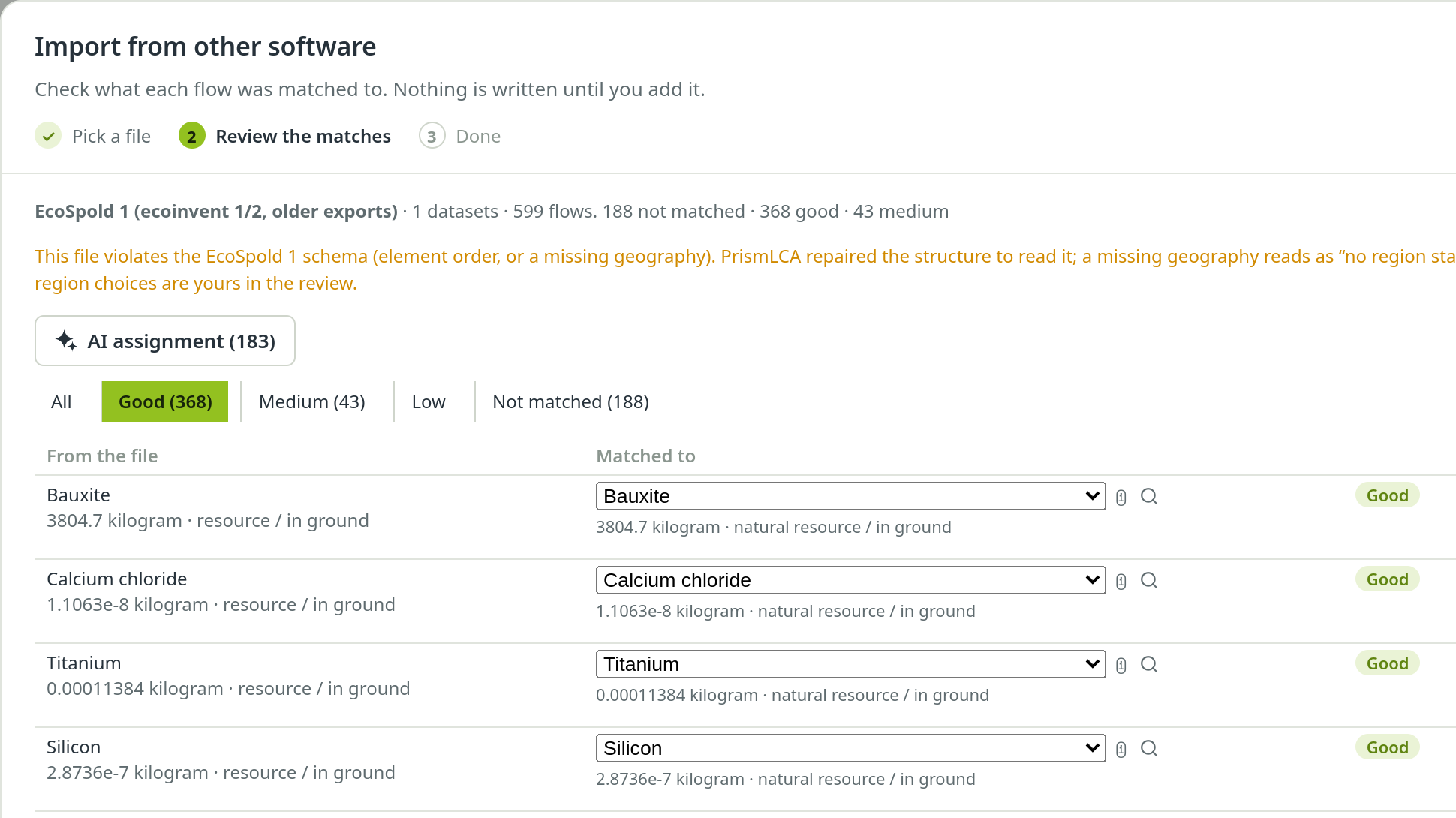
Import SimaPro CSV, openLCA JSON-LD, EcoSpold 1 and 2, ILCD and Excel into your library. Flows are matched by rules first, then by an AI model, and you review every match before anything is written.

  • Multi-output processes split by their allocation
  • Waste booked to its treatment
  • Mass and volume bridged where a flow needs it
The import review: flows matched by rules and by an AI model, each with its confidence

Transport distances, calculated

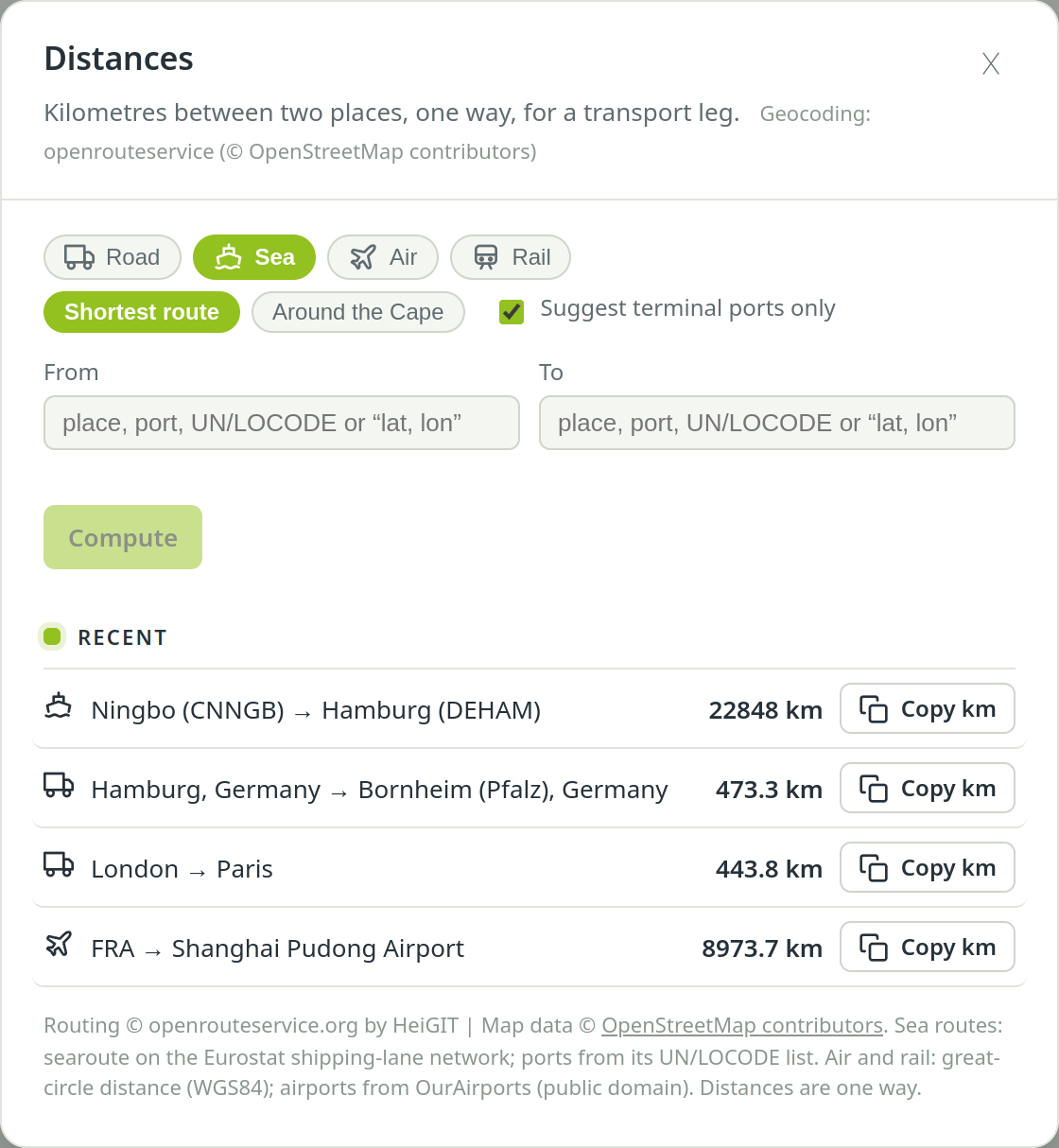
From place names to kilometres: road routes, sea lanes with ferries and terminals, flights airport to airport — one row per leg, ready to copy, with GLEC adjustments.

  • Bring your own free routing key
  • Ports and airports found for you
The Distances sheet with sea, road and air routes in kilometres

End-of-life statistics from Eurostat

Ask for the end of life of a material and the assistant looks it up in Eurostat: recycling, energy recovery, incineration and landfill by country and material, with the year, the source and every estimate flagged.

  • Packaging, municipal and general waste tables
  • Free public data, no key needed
  • A missing value is never read as zero

● eurostat_eol env_waspac · Germany · plastic packaging · 2023

Plastic packaging waste generated: 3.12 Mt, 37.5 kg per person

  • Recycling51.3 %1.60 Mt
  • Energy recovery47.2 %1.47 Mt
  • Other recovery0.4 %0.01 Mt

Recycling counts what enters sorting; sorting losses still need accounting.

Source: Eurostat (© European Union), table env_waspac, CC BY 4.0

  • Bring your own ecoinventImport ecoinvent 3.12 from the ecoSpold files you already licence; the impact methods come with it.
  • Search that understands what you meanKeywords plus a local language model: “truck” finds “lorry”. And it says so when your material simply isn't there.
  • Filter by region and kindProduction, market or market group, and any set of regions — a region is a filter, not a search word.
  • Regional variants in one cardA dataset that exists for many regions shows up once, with a region picker; aggregates such as GLO and RoW come first.
  • AI matching for imported dataFlows that rules can't place are matched by an AI model — with synonyms and unit bridges, and a review before anything is written.
  • Excel round tripExport a model to a two-sheet workbook and read it back with formulas, uncertainty, comments and tags.
  • Send a model, take one inOne .prism file, and you choose what goes with it: library datasets, parameters, scenarios, study data, reports, even conversations and history. Background data is referenced, never copied.
  • Back up a whole workspaceOne file holds everything; restoring it makes a workspace of its own and never overwrites one.
  • Provenance on every datasetWhere an imported dataset came from is recorded on it, and stays there.

MCP

Bring your own agent: PrismLCA speaks the Model Context Protocol.

6 features

Drive PrismLCA from Claude Code, Codex or Claude Desktop

A built-in MCP server gives external agents most of the in-app assistant's tools. Everything they do shows up in the window you are looking at, lands in the audit log under their name, and can be undone.

  • Most of the built-in assistant's tools
  • Destructive actions confirmed in the app
  • Long calculations run as background jobs

> Add the shipping box to the hose reel set: corrugated board, mass m_carton, RoW market. Then recalculate climate change.

● prismlca · search_background (query: "corrugated board box", geographies: ["RoW"])
⎿ 6 hits — market for corrugated board box (RoW, kilogram) first

● prismlca · get_process_details (market for corrugated board box, RoW)
⎿ reference product corrugated board box · 1 kg · market, RoW

● prismlca · create_process (name: "Packaging — corrugated box", unit: "unit")
⎿ created in Garden hose reel set — cradle-to-grave

● prismlca · edit_exchange (add: market for corrugated board box, amount: "m_carton")
⎿ linked · 0.45 kg (formula m_carton)

● prismlca · calculate (EF v3.1 · climate change · GWP100)
⎿ 51.86 kg CO₂-eq — the box adds about 1 %

Done. The shipping box is in, linked to m_carton; climate change is 51.86 kg CO₂-eq, the box about 1 % of it. Both changes are in PrismLCA's audit log under Claude Code — undo them there if you like.
PrismLCA · Audit log

  • Claude CodeCreate process “Packaging — corrugated box”
  • Claude CodeAdd input “market for corrugated board box” = m_carton
  • Use the subscription you already haveYour agent runs on your Claude or ChatGPT plan, not on per-token API billing. PrismLCA itself needs no AI key for this.
  • One-click connectionSettings writes the MCP configuration for Claude Code, Codex and Claude Desktop — preview first, backup kept — and tests it.
  • Questions come to the appWhen an external agent needs a decision, the question card appears in PrismLCA.
  • Starts when needed, tidies up after itselfA tool call starts PrismLCA if it isn't running; an instance nobody uses closes again.
  • API firstEverything the app does runs through a local, documented REST API.

Control and privacy

Every step can be traced and taken back, and your data stays yours.

8 features

Undo everything, see everything

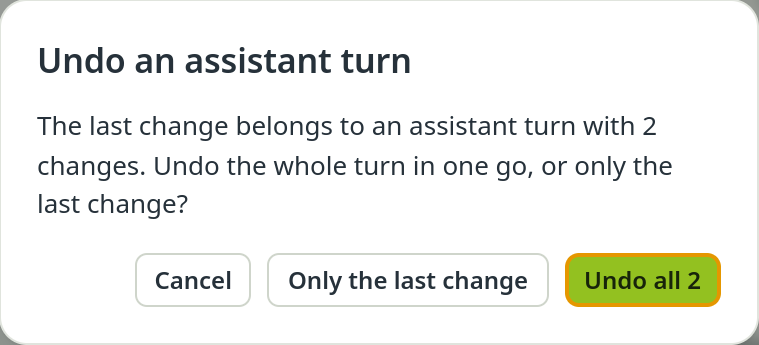
Every change lands in an audit log written in process names, not IDs — whether you made it, the assistant did, an import or an external agent. Any of it can be taken back, a whole assistant turn at once.

  • Undo in one model never touches another
  • Ctrl+Z and Ctrl+Y
  • A whole assistant turn in one step
Undo an assistant turn: undo the whole turn or only its last change
  • An audit log in plain namesWho changed what and when — you, the assistant, an import or an external agent.
  • Guardrails before every writeChanges are validated before they are written; deleting a model always asks.
  • Your data stays on your computerA desktop app: models, datasets and reports live locally. No cloud account, no upload.
  • No telemetry, no trackingNothing leaves your computer without an action of yours. Every network channel starts switched off.
  • Every connection listedThe privacy notice in the app names every connection PrismLCA can make, what it sends and to whom.
  • Keys in your system's keychainAPI keys are stored encrypted in your operating system's credential store, never in plain text.
  • Updates when you clickPrismLCA checks for updates only when you ask.
Beta

Try it on your own product.

Free and open source. Start free with the BAFU database or bring your existing ecoinvent licence.