HandbookData
Background databases
This page explains what a background database does for your model, how the free BAFU database and a licensed ecoinvent differ, and how to manage them: add impact methods, use both side by side, cite them and remove one again.
What a background database is#
Your model describes the part of the product system you know: the reel, its parts, the assembly, the transport to the customer. Everything further upstream — the electricity, the granulate, the steel, the truck — comes from a background database: thousands of ready-made processes, each with its own supply chain down to the elementary flows (what is taken from and emitted to the environment). See the glossary for these terms.
A background database is read-only. You find its datasets in the search panel on the Model page and link them into your model as locked references. To change one for your study, you copy it into the model with Localize (edit) — see Find the right dataset.
PrismLCA ships without any background data. You bring your own copy, and the import reads it once from files on your disk. There is no login and nothing is downloaded. Each workspace holds at most one of each supported database: one ecoinvent and one BAFU.
BAFU or ecoinvent?#
| BAFU:20XY | ecoinvent | |
|---|---|---|
| What it is | The Life Cycle Inventory database of the Swiss Federal Administration, published by the Federal Office for the Environment (FOEN/BAFU). Updated about once a year. | The most widely used commercial LCI database, published by the ecoinvent Association. |
| Cost and licence | Free. You download it from openLCA Nexus with a free account and accept its terms of use. | Needs an ecoinvent licence. You download the files from ecoQuery under your licence and import them. |
| Size | 11 947 datasets in BAFU:2026 v1, strongest for Swiss and European processes. | About 26 500 datasets, worldwide. |
| What you point PrismLCA at | The ecoSpold files folder of the download. |
The extracted ecoSpold 2 datasets folder, plus the LCIA Implementation workbook of the
same release. |
| Impact methods | Brings none of its own. It uses ecoinvent's methods if ecoinvent is installed, otherwise the methods that ship with Brightway. | Come from the LCIA workbook: EF, IPCC, ReCiPe, CML and others. |
If you have an ecoinvent licence, import ecoinvent first: its list of elementary flows and its impact methods then become the reference for everything else. Without a licence, BAFU alone is enough to model, calculate and report.
Import a database#
On a fresh install the start page offers Import ecoinvent and Import BAFU. Later, open the Overview and choose Background in the toolbar: the Inventory section offers Import ecoinvent… or Import BAFU:20XY… for whichever database the workspace does not have yet. With both installed, nothing is offered.
The step-by-step guide, including what to have on disk and how long it takes, is on Set up your first workspace. When the import is done, the sheet shows Imported, the number of datasets and a Cite as: line. The search index is then built in the background; the search panel shows its progress.
The Background panel#
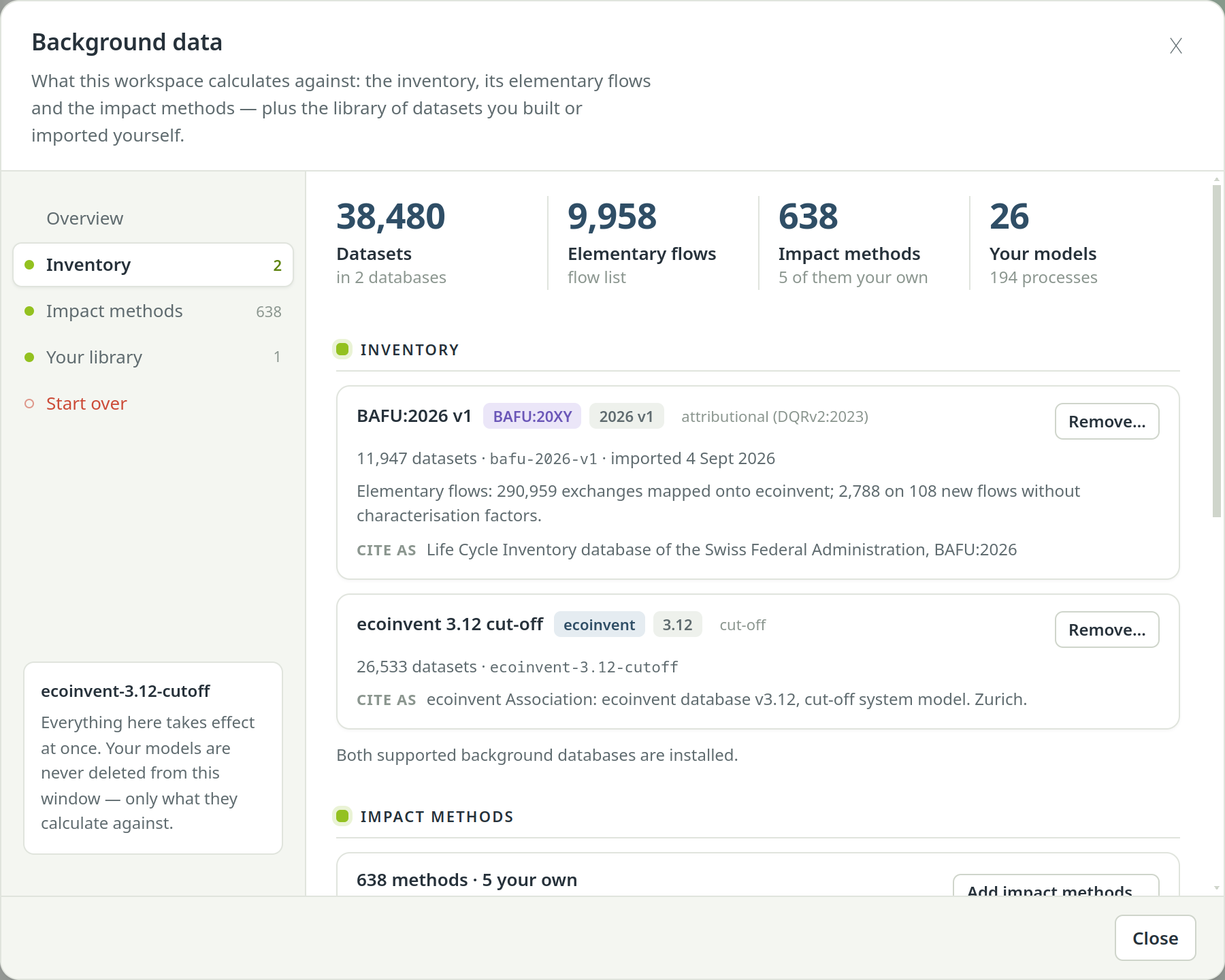
The Background data sheet shows four numbers first: Datasets, Elementary flows, Impact methods and Your models. Below them, one section per job. Everything in the sheet takes effect at once, and your models are never deleted from it.
- Inventory
- One card per installed database, with its version, system model, dataset count and import date, the Cite as text and a Remove… button. For BAFU the card also says how its elementary flows were mapped.
- Impact methods
- How many methods the workspace has and how many are your own, with Add impact methods….
- Your library
- Your own datasets and every import from other software — see Your library: My processes.
- Start over
- Deletes the background data of this workspace so a release can be imported again — see Workspaces, backups, starting over.
Add impact methods#
An ecoinvent import without the LCIA workbook gives you an inventory with no methods, so nothing can be calculated.
The Impact methods section then shows No impact methods. To fix it, choose Add impact methods… and
pick the LCIA Implementation workbook (.xlsx) of the same release. PrismLCA links its
characterisation factors against the elementary flows already imported.
The same button adds or overwrites methods from a workbook in a workspace that already has some. Your own methods, built under LCIAManage methods, are counted separately — see Impact methods.
Use BAFU and ecoinvent side by side#
With both installed, one model can mix datasets from both. They are two separate supply chains: a BAFU dataset never links into ecoinvent, and the other way round. Both use the same elementary flows, so the same impact method assesses a BAFU dataset and an ecoinvent dataset in the same way.
In the search panel#
The search panel ticks the largest background database (ecoinvent, if you have it) and My processes by default. Tick the BAFU database to search it as well. Each hit shows which database it comes from.
In the chat#
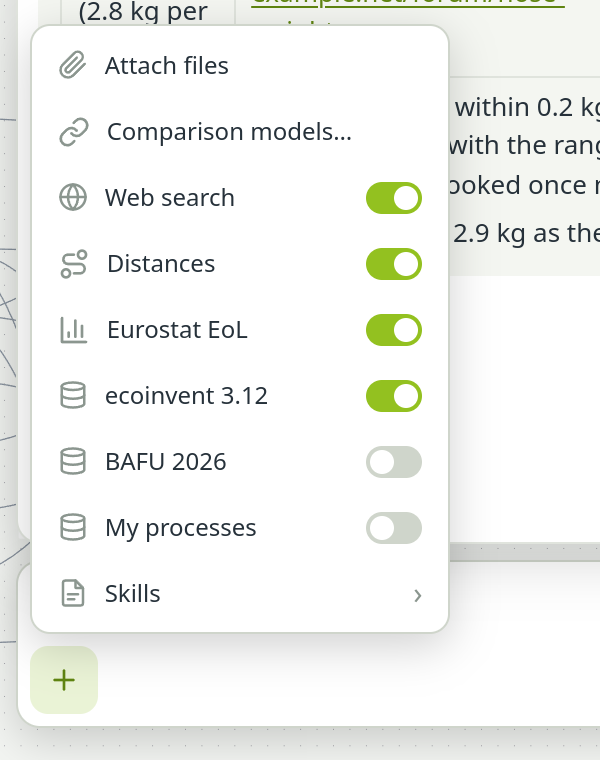
The assistant searches only the databases you release to the chat. Open the chat's + menu: every background database has its own switch, and so has My processes. By default the main background is on and everything else is off. A database you switch off stays invisible to the assistant in that chat.
Which database the assistant prefers#
When both databases are switched on and both hold a fitting dataset, the assistant has to choose. Set the rule under SettingsModellingBackground databases, field When several are released to a chat:
- Let the assistant decide — and say why (the default): it chooses by geography, reference year and system model, and names its choice.
- Prefer a database: it takes that database's dataset and uses the other one only when the preferred one has nothing that fits. It then says so in the exchange comment.
A preferred database that is switched off in a chat does not apply in that chat.
Things to know about BAFU#
- Most of its flows map onto the workspace's flow list. BAFU uses older flow names. The import maps them onto ecoinvent's flow list, or onto the flow list that ships with Brightway if ecoinvent is not installed. Flows with no counterpart, such as road noise, a few substances and BAFU's own energy accounting, become new flows without characterisation factors. The import report and the BAFU card say how many there are and how many exchanges they carry.
- Climate results match BAFU's own. Measured across all 11 947 datasets, 98.4 % of PrismLCA's GWP 100 results land within ±2 % of BAFU's published values.
- Ecological Scarcity totals differ. PrismLCA assesses BAFU datasets with ecoinvent's implementation of the methods, so that BAFU and ecoinvent datasets in one model stay comparable. BAFU's own results use other factors for land use, ozone depletion and water, and they include noise, which has no factors here. Your Ecological Scarcity (UBP) figures for BAFU datasets will therefore differ from the ones BAFU publishes, and the totals will tend to be lower. This is a deliberate choice, not an import error.
- No market datasets. BAFU has no “market for …” datasets, so the search filters M (market) and G (market group) find nothing in it.
- BAFU first, ecoinvent later works. Without ecoinvent, PrismLCA first installs Brightway's flow list and impact methods (the ecoinvent 3.9 implementation). If you import ecoinvent later, everything is rewritten onto ecoinvent: the BAFU exchanges are re-mapped and the bundled methods are replaced by those from your workbook. The BAFU card then says how many exchanges moved.
Cite the database#
Both databases ask to be cited. The Cite as line on each Inventory card gives the text, for example:
- Life Cycle Inventory database of the Swiss Federal Administration, BAFU:2026
- ecoinvent Association: ecoinvent database v3.12, cut-off system model. Zurich.
You rarely have to type it: the study report lists every background database that a model draws on, directly or through datasets in My processes, and only those.
Remove a database#
Open the Background panel#
On the Overview, choose Background.
Choose Remove… on its card#
A short warning appears in the card.
Confirm#
Choose Remove followed by the database name, or Keep it to back out. PrismLCA deletes the database and its search index.
The removal is refused while any model still uses the database, so no model is left with links that point nowhere. The impact methods stay, and so do the elementary flows that other data still uses. To import a newer release of the same database, create a new workspace for it — see Workspaces, backups, starting over.