HandbookData
Your library: My processes
Every workspace has one library of datasets that belong to you: processes you built yourself and everything you imported from other software. This page shows what lands there, how your models use it, and how to edit or remove what is in it.
What the library is#
My processes is a database that sits beside your background data in every workspace. It is created with the first background import and cannot be renamed, because your models point at it by name. Unlike the background, it is writable: you can change its datasets. Unlike a model, it is not a study: it has no canvas, no results and no report, and it does not appear in the model picker.
The library is live-linked. A model that uses a library dataset points at it the same way it points at an ecoinvent dataset. Change the dataset in the library, and every model that uses it changes with it. That is the reason to have a library rather than a copy in each study: a correction reaches every model at once.
What lands in the library#
- Imports from other software
- Everything the import wizard writes goes into My processes — SimaPro, openLCA, EcoSpold and ILCD data. See Import from other software.
- Processes you move there
- A process you built in a model, moved into the library with Move to library (see below).
- Datasets that arrive with a model
- When you import a
.prismmodel file, the library datasets it uses travel with it and land in your library as one import. See Share and export models.
The Overview counts the datasets under My processes among its numbers.
Move a process into the library#
When you have built a process that other models should use too — your own injection moulding, a supplier's granulate — move it into the library:
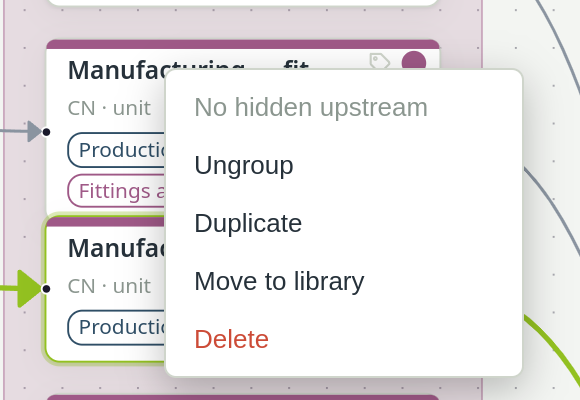
Right-click the process on the canvas#
It must be a process of your model, not a locked background reference.
Choose Move to library#
The process leaves the model and becomes a dataset in My processes. On the canvas it stays where it was, with the same arrows, but it is now a locked reference to the library dataset. Other models can now use it too.
- No formulas allowed. A process whose input amounts use formulas cannot be moved: the formulas depend on the model's parameters, and the library has none. Replace the formulas with plain amounts first.
- Tags stay behind. Tags such as the life-cycle phase belong to the model, so the moved process loses them.
- It can be undone with Undo, like any other edit in the model.
Use library datasets in a model#
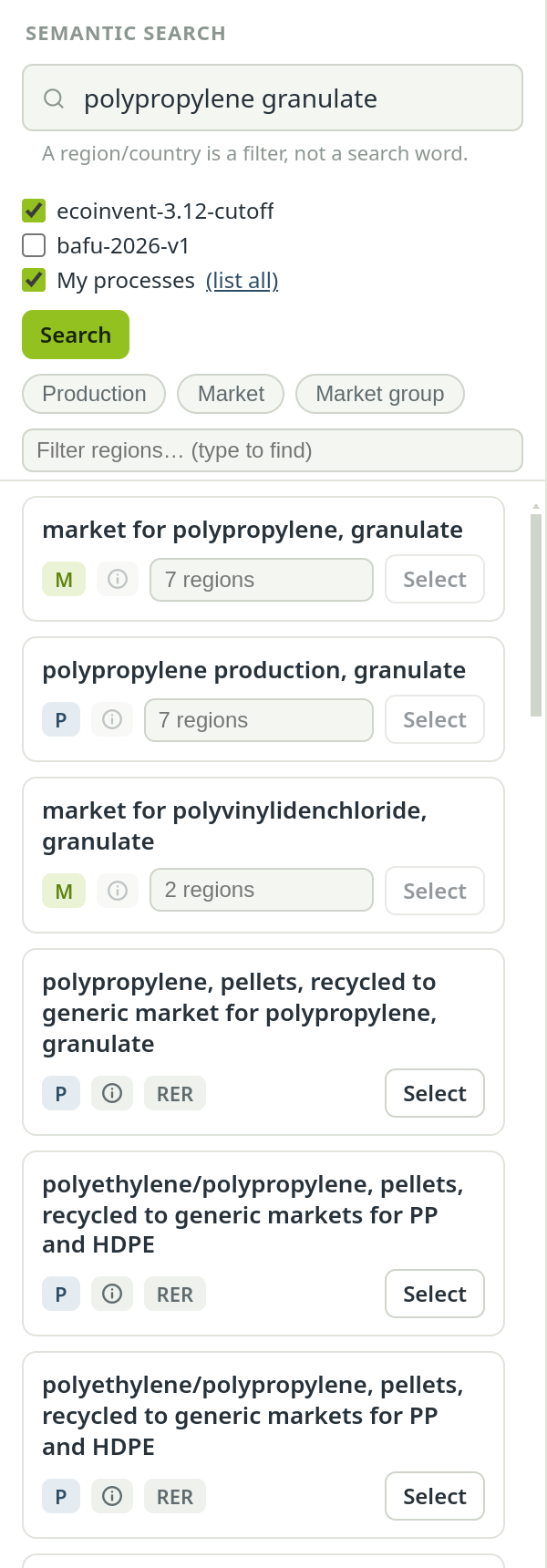
On the Model page, the search panel ticks My processes by default, next to your background database. Library datasets then appear among the search results. Add one with Select or by dragging it onto the canvas, exactly like a background dataset. To see everything in the library without a search term, choose (list all) next to My processes under the search field.
Edit a library dataset#
Library datasets are edited where you find them, not on a canvas:
Find the dataset in the search panel#
Search for it, or use (list all).
Click the pencil on the result#
Only library datasets have one; background datasets cannot be edited.
Edit it in the Edit dataset sheet#
The same editor as for a process in a model: name, reference product, location, unit, inputs and outputs. Every change applies at once; there is no Save button.
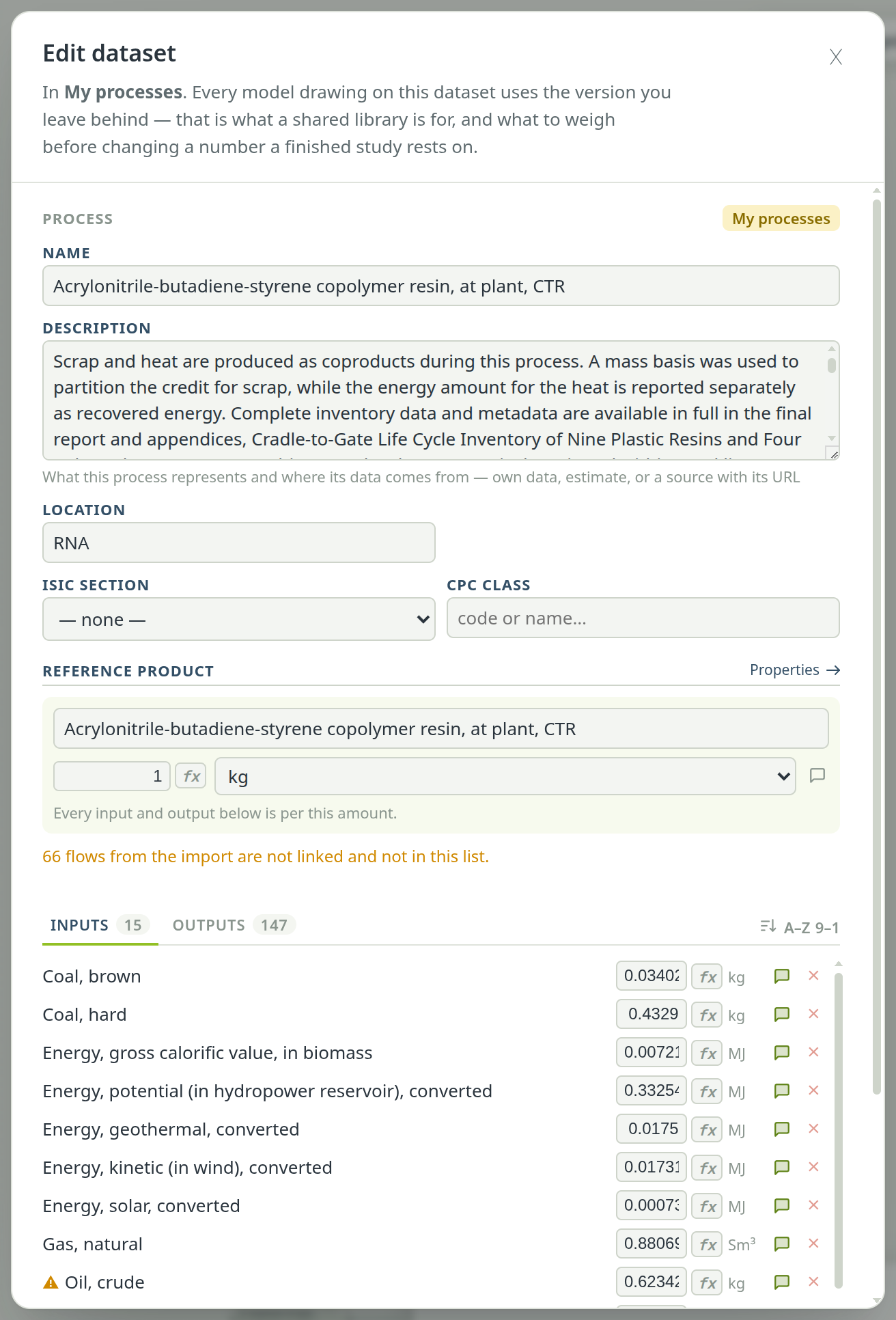
The sheet reminds you that every model using the dataset will use the version you leave behind.
Change a dataset for one model only#
If a study needs a variant of a library dataset, do not edit the library. Right-click the dataset on that model's canvas and choose Localize (edit): this copies it into the model, where you can change it without touching the library or any other model.
Remove an import#
Each import stays identifiable inside the library, with its name, format, date and source file, so you can take it out again as a whole.
Open the Background panel#
On the Overview, choose Background and go to Your library. It lists every import, with its dataset count, and says how many datasets you made yourself.
Choose Remove… on the import#
If no model uses its datasets, they are removed at once. If a model does, PrismLCA names the models and how many exchanges in each point at the import, and the button changes to Remove it anyway.
Removing an import only removes the datasets that import brought. The library itself and the datasets you built yourself stay.