HandbookExternal agents (MCP)
Stay in control
An external agent works on your models while you watch in the PrismLCA window. This page shows where you see what it does, how you take changes back, how it asks before anything that cannot be undone, and how you end the connection.
See who is connected#
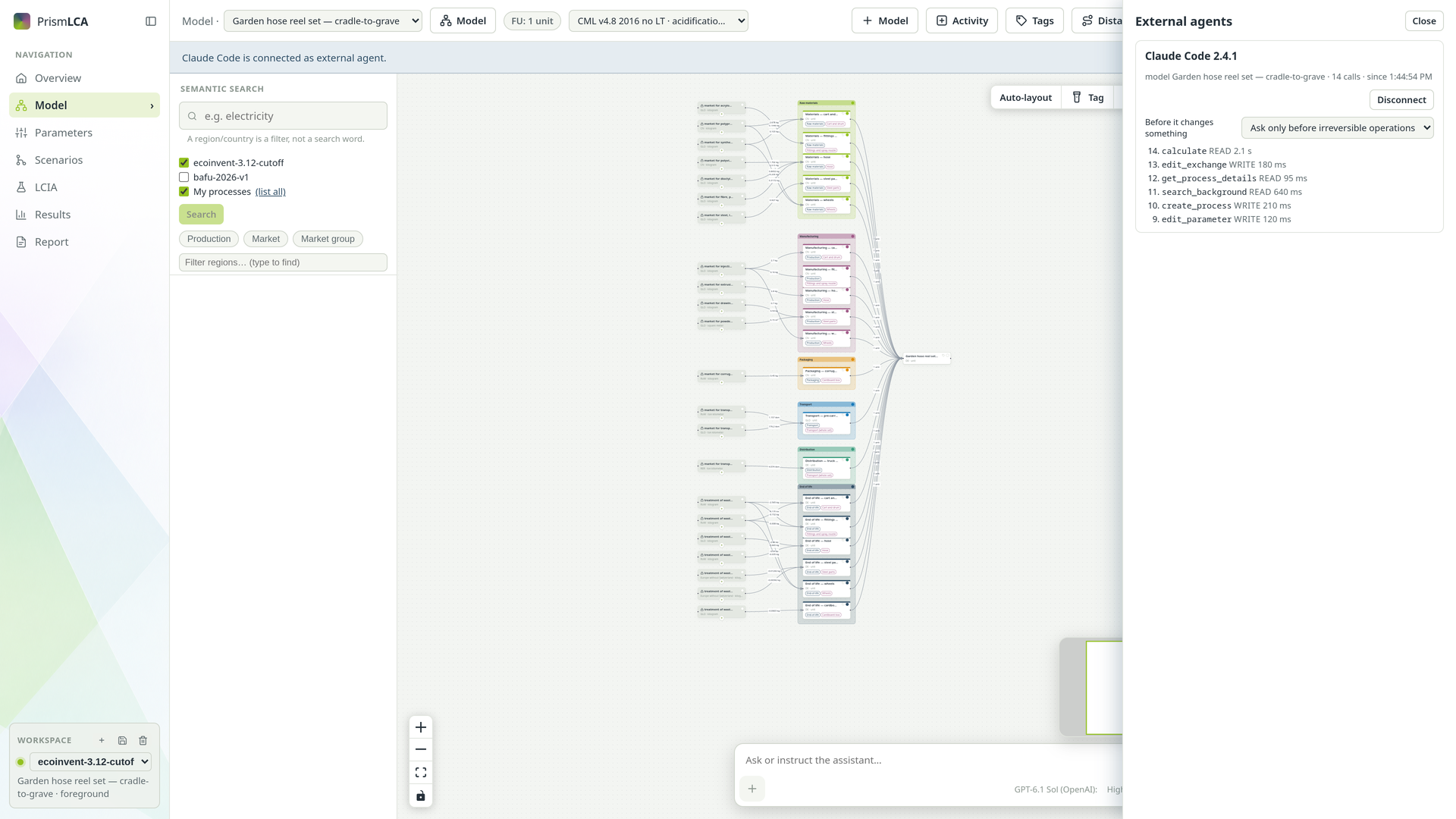
As soon as a client connects, a bar under the toolbar names it — for example Claude Code is connected as external agent. Several sessions of the same client are counted, as in Claude Code (2 instances). Choose Show to open the External agents panel.
For each connected client the panel shows:
- which model it works on, how many calls it has made, and since when;
- its recent tool calls, newest first, with how long each took — failed calls and refusals are marked and show the reason;
- Before it changes something: how careful this client has to be (see below);
- Disconnect, which ends this one client's session.
Every change in the audit log#
Everything an external agent changes lands in the model's Audit log — on the Model, Parameters and Scenarios pages — under the client's name, exactly like your own edits and the built-in assistant's. The changes of one tool call are grouped, so you can see what belonged together.
Changes are undone the usual way: Undo in the toolbar takes back one step, whoever made it. The agent can also take back its own last changes with its undo tool, without asking. More on the log and on undo in Check, undo and the audit log.
Nothing irreversible without you#
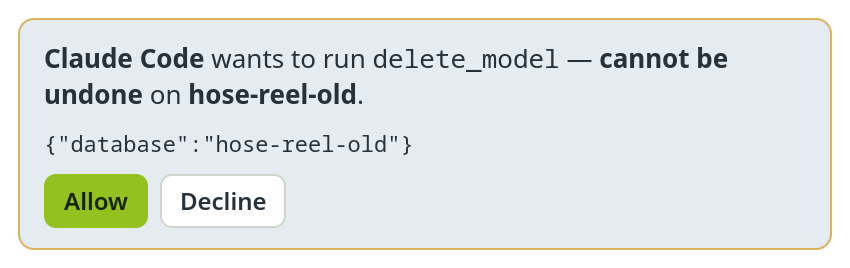
Most changes can be undone, so they run without asking. A few cannot: renaming or deleting a model, changing, renaming or deleting a custom impact method, and changing, renaming or deleting a method family. Before such a call runs, a card appears in the External agents panel — the panel opens by itself, and the bar under the toolbar says … is waiting for your answer. with an Answer button.
The card names the client, the tool, what it acts on, and says cannot be undone. Below it you see the arguments of the call. Choose Allow to let it run or Decline to refuse; a declined call does not run and the agent is told so.
How careful each client must be#
Per connected client, the select Before it changes something in the panel sets when a card appears:
| Choice | What asks first |
|---|---|
| Ask before every change | Every call that writes anything. Useful for a first run, or a client you do not know yet. |
| Ask only before irreversible operations (default) | Only the calls that cannot be undone. |
| Ask only before deleting | Only deleting a model, a custom method or a method family. |
Deleting a model, a custom method or a method family asks in every mode. A client can be set to approve its own tool calls, so the card in PrismLCA is the one confirmation that always comes from you. Claude Code additionally asks in its own window before such a call.
While PrismLCA is importing a background database, the agent's write calls are refused until the import has finished.
Questions from the agent#
When an agent needs a decision — which electricity mix, which end of life — it can ask you through PrismLCA. The question appears as a card in the External agents panel, which opens by itself: … has a question, the options as buttons, and a field …or type an answer. Pick an option and choose Answer, or type your own and choose Send.
A question or approval card waits up to 15 minutes. Meanwhile the client is told that PrismLCA is waiting for you, so it does not give up. If nobody answers in time, the call ends with “no answer” and the agent carries on with what does not need it, or asks again later.
Which model and which workspace#
When a client connects, it works on the model that is open in the PrismLCA window, or, if no window is open, the model you opened most recently. It can open another model of the same workspace; the canvas then switches to that model as if you had picked it.
The workspace is yours to choose. If you switch to another workspace in the window, the agent's session ends — a model of the same name in another workspace is not the same model. The client's next call reconnects in the workspace that is now open.
An external agent may search every background database in the workspace and your library. The database switches in the built-in chat do not apply to it; ask it in your prompt if you want it to stay with one database.
End the connection#
| To … | Do this |
|---|---|
| End one client's session | Disconnect in the External agents panel. The client can reconnect with its next call. |
| End all sessions at once | New token under SettingsAIMCP. The server restarts with a new key; every connection ends. |
| Keep every agent out | Untick Let external agents drive PrismLCA (MCP server). Nothing listens any more, and a client's bridge no longer starts PrismLCA. |
| Remove one client for good | Delete the prismlca entry from that client's configuration, or
restore the backup PrismLCA made when it wrote the entry. |