HandbookModelling
Find the right dataset
Most of an LCA result comes from background datasets, so choosing them well matters more than almost any other modelling step. This page shows how to search, how to read a hit, and how to choose when nothing fits exactly.
Search by meaning#
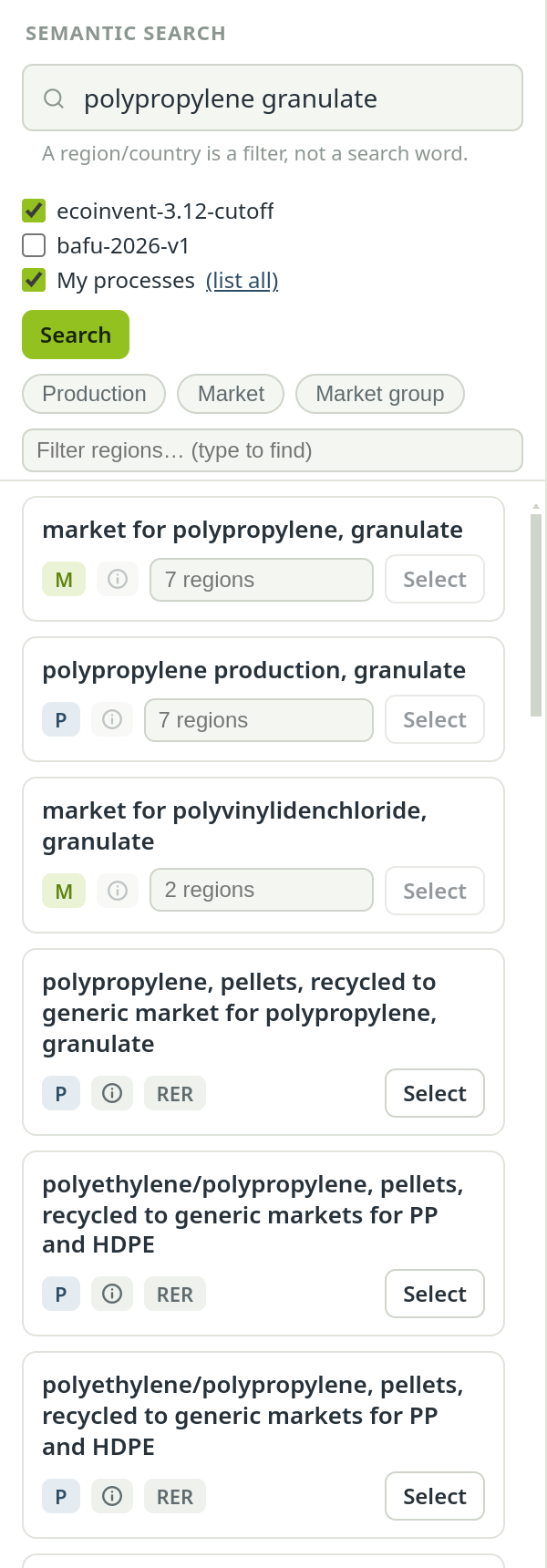
The Semantic search panel on the left of the Model page understands what you mean, not only the words you type. garden hose finds PVC and rubber hose datasets even if none of them is called that. The language model behind it runs on your computer; your search terms are not sent anywhere.
Type plain words#
Describe the product or service, e.g. polypropylene granulate or electricity medium voltage. Press Enter or choose Search.
Narrow down#
Use the type and region filters below the search field (next sections).
Inspect before you use#
Open the details of the two or three best hits with the ⓘ button and read what each dataset really covers.
Add it#
Select places the dataset on the canvas as a locked reference; dragging the hit onto the canvas does the same at the spot where you drop it. See Build on the canvas.
Leave places out of the search text#
The search reads a dataset's name, reference product and the start of its description — not its region. electricity Germany does not find German datasets — the word Germany only blurs the rest of the query. When you type a place, the panel reminds you that a region is a filter, not a search word. Use the region filter instead.
Choose where to search#
Under the search field is one tick box per place to look: each background database (ecoinvent, BAFU) and, last, your library My processes. By default the largest background database and the library are ticked; a second background database is yours to add. With two background databases ticked, each hit carries a chip that says which one it comes from.
(list all) next to My processes shows everything in your library — useful when the question is “what have I got” rather than a search term.
Index and Reindex#
The search needs an index for each database. An import builds it for you, in the background. If a database has no index yet, an Index button appears next to its tick box; if the index is out of date, the button reads Reindex. Building embeds every dataset on your computer — for ecoinvent one to two hours, for a small library seconds; a progress bar shows how far it is and how long it has left. While an index is missing or out of date, the panel says that some results may be missing.
Filter by type: production, market, market group#
Three chips filter by activity type: Production, Market and Market group. Click one or several; with none selected, all types are shown. Each hit shows its type as a letter chip — P, M or G. The type is an LCA decision, not a detail:
- P — Production
- One specific way of making a product in one place: PVC made by suspension polymerisation in Europe, electricity from one wind farm type. Choose it when you know the technology or the supplier.
- M — Market
- The average supply of a product in a region: a mix of the production routes that supply it, with transport to the consumer and losses on the way. Choose it when you buy a product without knowing where it was made — the usual case for materials and energy.
- G — Market group
- Several markets combined into a larger region, such as Europe or the world. Choose it only when you really mean that larger area; where one country's market is meant, a market group blurs the geography.
Filter by region#
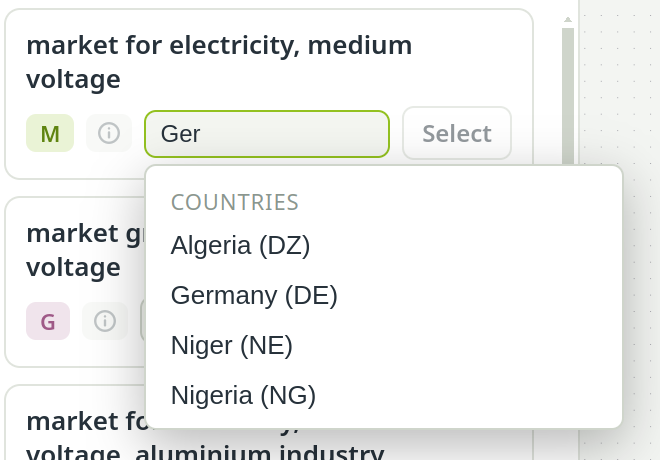
Type into Filter regions… to pick a region code such as DE, RER (Europe), GLO (global) or RoW (rest of the world). One region and several regions behave differently, and the line under the chips says which you have:
- One region puts its hits first — before better matches from elsewhere. Nothing is hidden; keep scrolling before you decide nothing fits.
- Two or more regions are a real filter: hits from other regions disappear.
Many datasets exist in many regions. They take one row in the list, with a picker that says how many regions there are. Pick one there before you add the dataset — until you do, Select says Pick a region first.
Read a hit#
Each hit shows, from left to right:
- The dataset name (long names are cut; hover for the full one).
- The type chip — P, M or G.
- weak, when the hit is below the similarity threshold: a neighbour, not a match. When nothing resembles your search at all, a note above the list says so.
- The source chip: My processes for your own datasets, or the background database when two are ticked.
- ⓘ for the full details: description, flows, metadata. A dataset's comment often says what it was really built for, which the name does not.
- The region, or the region picker.
- A pencil on your own library datasets, to edit them in place. Every model that uses the dataset follows the change.
- Select.
Choose a good proxy#
Often no dataset matches exactly — no PVC hose from China, no reel of this design. A proxy is a deliberate stand-in, and a good one is chosen in this order:
- Search again with other words: the material, the process, a synonym. Remove the region filter. Most “no match” cases are search misses, not real gaps.
- Same product, other region: a neighbouring region, then a broader one (RER, GLO), then RoW. The technology stays the same, so this is usually the smallest error.
- A market when you do not know the supplier.
- A closely related product made by a similar process — a similar plastic, a similar alloy.
- A generic dataset only for small inputs, and say so in the report.
- Leave it out and declare the gap when nothing is close enough. A misleading dataset is worse than an honest gap.
Whatever you choose, write the reason into the comment on the input (the pencil in the inspector). A proxy without a reason is the first thing a reviewer will ask about.
When to localize#
A reference is used as it is. Localize it — right-click, Localize (edit) — only when you need to change it: a different electricity mix, your supplier's energy demand, a missing input. The copy becomes one of your own processes and no longer follows the background database. If the dataset fits, leave it as a reference; if you will reuse your adapted version in other models, consider moving it to My processes.
See also: Background databases · Find the hotspots