HandbookGet started
Key ideas in five minutes
A handful of ideas explain almost everything PrismLCA does. Read them once and the rest of the app behaves the way you expect.
Workspace and model#
- Workspace
- Your background data (ecoinvent, BAFU or both), your library My processes, and all the models built on them. You switch workspaces in the Workspace block at the bottom of the sidebar. Most people need one; a second ecoinvent release gets a workspace of its own.
- Model
- One product system — one study. It has its own canvas, its goal and scope, its parameters, scenarios, reports and chats. What other tools call a project or a product system is a model here.
Foreground and background#
A model links the two: your foreground processes take inputs from background datasets, and PrismLCA follows those links through the whole supply chain when it calculates.
References and Localize#
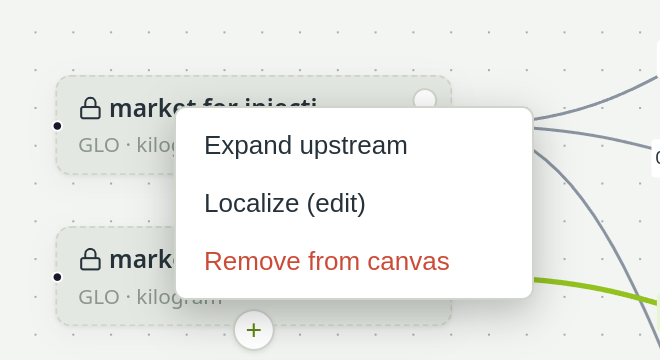
A background dataset on your canvas is a reference: a locked box that points at the original. You can link to it, but you cannot edit it, so the database is never altered by accident.
When you do need to change one — a different electricity mix, a lighter part — right-click it and choose Localize (edit). PrismLCA copies the dataset into your model as one of your own processes and points the arrows at the copy. The original stays untouched.
Your library: My processes#
Each workspace has one library called My processes. It holds datasets you want to reuse in several models, and everything you import from other software (SimaPro, openLCA, EcoSpold, ILCD) lands there.
- It is live. Models link to the library, they do not copy from it. Correct a dataset there and every model that uses it changes with it.
- Moving in: right-click one of your processes and choose Move to library.
- Finding and editing: tick My processes in the search panel; the pencil on a hit edits that dataset.
See Your library: My processes.
The functional unit#
Every result is “per something”: per bottle, per kilogram, per year of use. In PrismLCA that something is the reference output of the process you calculate.
- Calculate
- calculates one reference unit of the process you selected — the toolbar shows it as FU: 1 …. Select your final product, and the result is per product.
- Amounts
- on arrows are always per one unit of the consuming process's reference output. “1.2 kg polypropylene” into a reel means 1.2 kg per reel.
- Functional unit (text)
- goes into Model infoObject of study, in words a reader understands: “1 garden hose reel set with 20 m of hose, delivered to the retailer”. The report quotes it from there.
There is no Save button#
Every change is written the moment you make it: a typed amount, a moved box, a switched setting. There is nothing to save and nothing to lose by closing PrismLCA. Settings works the same way: a change applies as soon as you make it. The only confirm buttons you meet are in dialogs that create something, such as New model. Model info saves its text when you close it, however you close it.
Everything is recorded, and almost everything can be undone#
- Undo and Redo in the toolbar take back changes one at a time. For a turn of the assistant with several changes, PrismLCA asks whether to undo the whole turn or only the last change.
- The Audit log records every change with its time and its author — you, the assistant, or an external agent.
- The log is kept with the workspace and survives a restart. Undo does not: it reaches back to the start of the current session.
- A few actions cannot be undone, such as deleting a whole model. PrismLCA asks before them, and the log marks such entries with no undo.
See Check, undo and the audit log.
The assistant is optional#
Your data stays on your computer#
There is no account and no cloud. Workspaces, models, chats and reports are files in your user account; nothing leaves the computer unless you switch a feature on. Where exactly the files are is listed in Install PrismLCA; every possible connection is listed in What leaves your computer.
See also: Tutorial: build it with the assistant